Creator Toolset
I have an illness. (Aside from this one.)
My actual illness is that I'm not good with other people's software. Sooner or later I run into one limitation that won't let me do something the way I want to, and it frustrates me enough that I go and build my own. I've been like this for years. It's why no-code never worked for me either, and probably why I gravitated towards code in the first place: I get frustrated by someone else's architecture and want to go in and fix it myself.
Over the years I've collected a long list of SaaS tools with that one thing I needed, used all the time, and could never get done properly, because it was never going to get fixed. So I kept building my own versions.
About two years ago I had the idea of turning that into a proper creator toolset and bought creatortoolset.com. Then I sat on the domain for two years. I kept building the tools anyway, one annoyance at a time, and this is the collection.
The footage library came first, in February, and it's the one that got out of hand. The rest started in July with captions and snowballed. I needed to send a screen recording and didn't want another subscription. Then I wanted those recordings to turn into SOPs someone could follow. Then an editor needed to leave notes on a cut. Then I wanted to understand why some of our Baby Acrobatics reels did ten times better than others, and somewhere to write the next one.
Somewhere along the way it became obvious what all of it is actually building towards.
Where this is going
An AI video editor.
Not one that replaces the editors I work with. (Mostly.) One that does the part nobody enjoys: I write a script, and it reads through every clip we've ever filmed, finds the moments that fit each line, and cuts a first version. Claude does the thinking, and our footage is plugged into it through an MCP.
It doesn't do that yet. But most of the pieces exist now, and they're the most interesting part of this page, so they go first. The everyday tools come after.
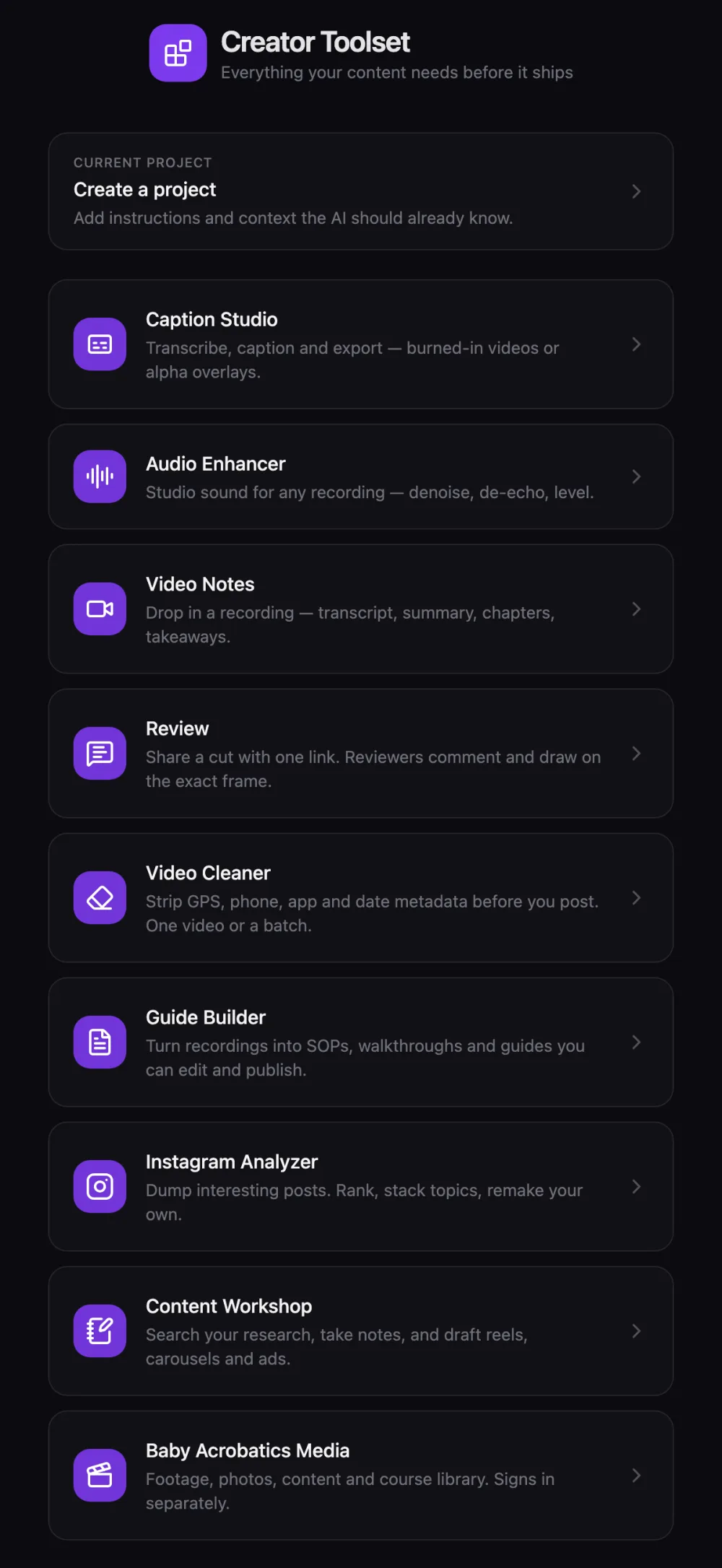
Here's what replaced what. Click a name to jump to it.
| What I was using | What I built | What it does |
|---|---|---|
| A shared drive and folder names | Media library | Every clip described, fingerprinted, face-blurred, and searchable by what happens in it |
| Scrubbing through old reels | Reel tracing | Points every finished reel back to the clips and seconds it was cut from |
| Nothing. Claude couldn't see our footage | Media MCP | Lets Claude search, look at, and pull clips out of the library |
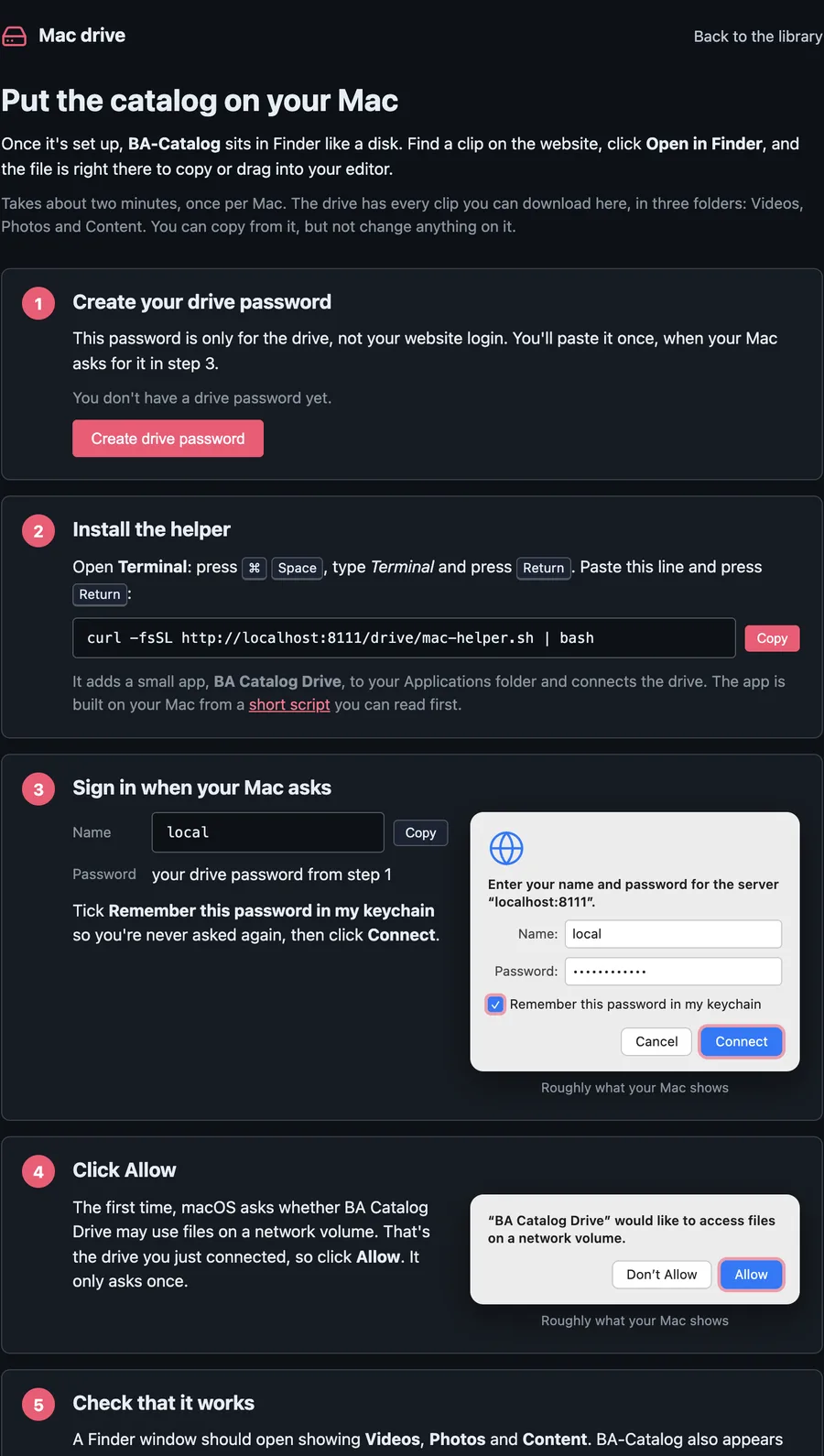
| A NAS that goes offline at night | BA-Catalog drive | The whole library as a read-only disk in Finder, different for each person |
| Metadata++ and HashManager | Video Cleaner | Strips GPS, phone, app and date tags before posting, and can give the file a new hash |
| Scrolling competitors' profiles | Instagram Analyzer | Save posts, pull stats, transcripts and comments, see which hooks actually work |
| ChatGPT in another tab | Content Workshop | Write reels and carousels with the research, frameworks and rules next to the draft |
| Frame.io | Review | One share link, frame-accurate comments, drawing on the frame, approve or request changes |
| Loom | Video Notes | Record or upload, get a transcript, chapters and an action plan |
| Notion, full of Loom links | Guide Builder | Turn a recording into a step-by-step SOP with screenshots |
| Descript | Caption Studio | Transcribe, fix, style and export captions, including a transparent layer for Premiere |
| Adobe Podcast | Audio Enhancer | Clean up a voice recording, level it, compare before and after |
I don't think everything needs to be custom software. Apparently I do think a surprising number of things need to be custom software for me. There is a distinction, although I'm not sure it makes me sound any more reasonable.
The media library
Everything else starts here. For an AI to edit our footage, the library has to know what's inside every clip, down to the second. It also has to be safe to hand to other people, because our kids are in most of it.
It isn't all the way there. Today every second has a fingerprint, and every clip has one detailed description built from its per-second frames. Describing each second on its own is where it's heading.
Search by what happened, not by filename. "Eating meat, red shirt" finds the clip whether the description says "red shirt" or "toddler in a red cotton t-shirt biting into a piece of steak". It takes under a second.
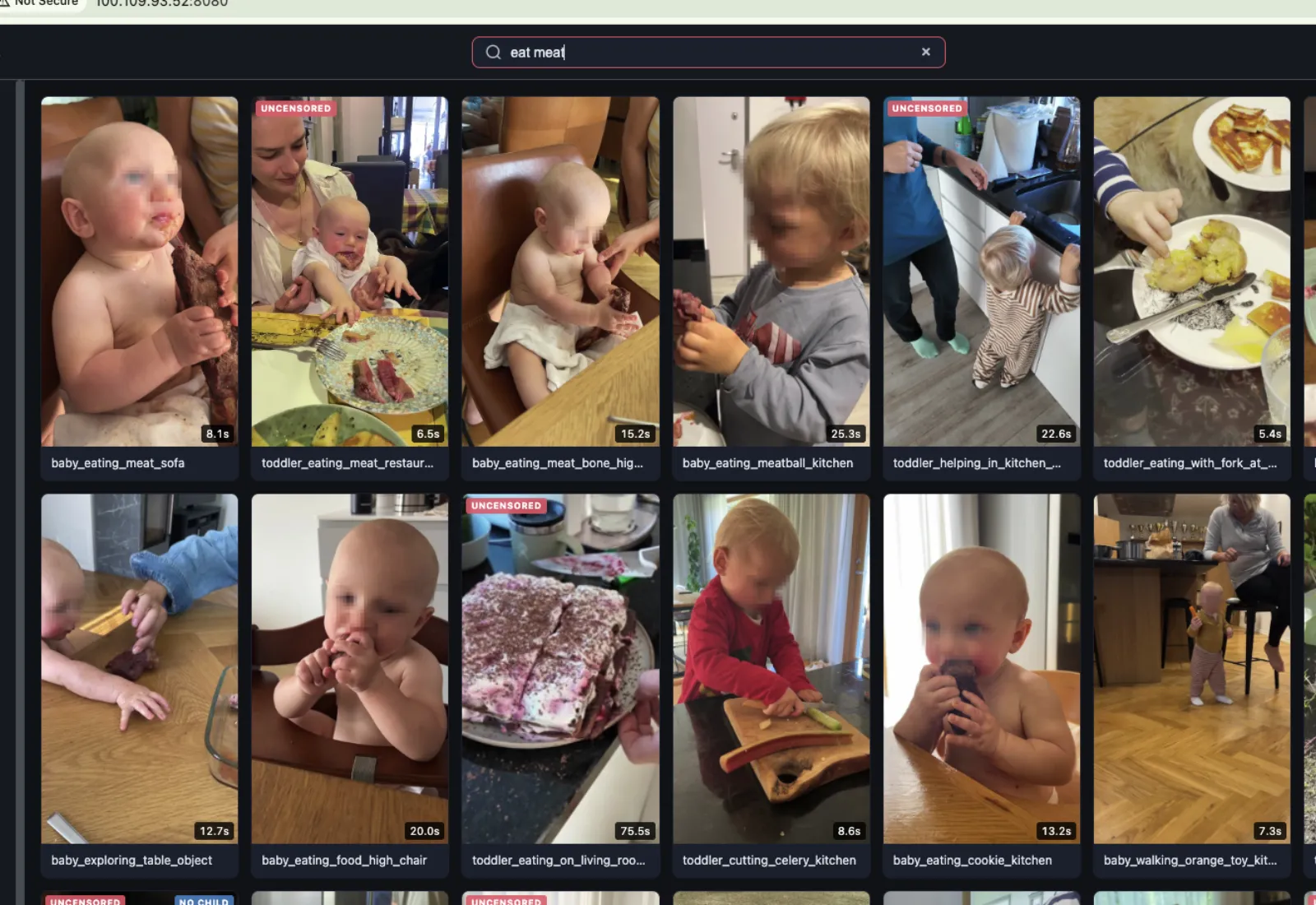
Kids' faces get blurred before anyone else sees a clip. Adults stay sharp, because a blurred adult makes a clip useless, while a child the system missed can be fixed by hand. The blurring also became a public tool of its own, Blur Kids' Faces.
Under the hood: what happens to every clip
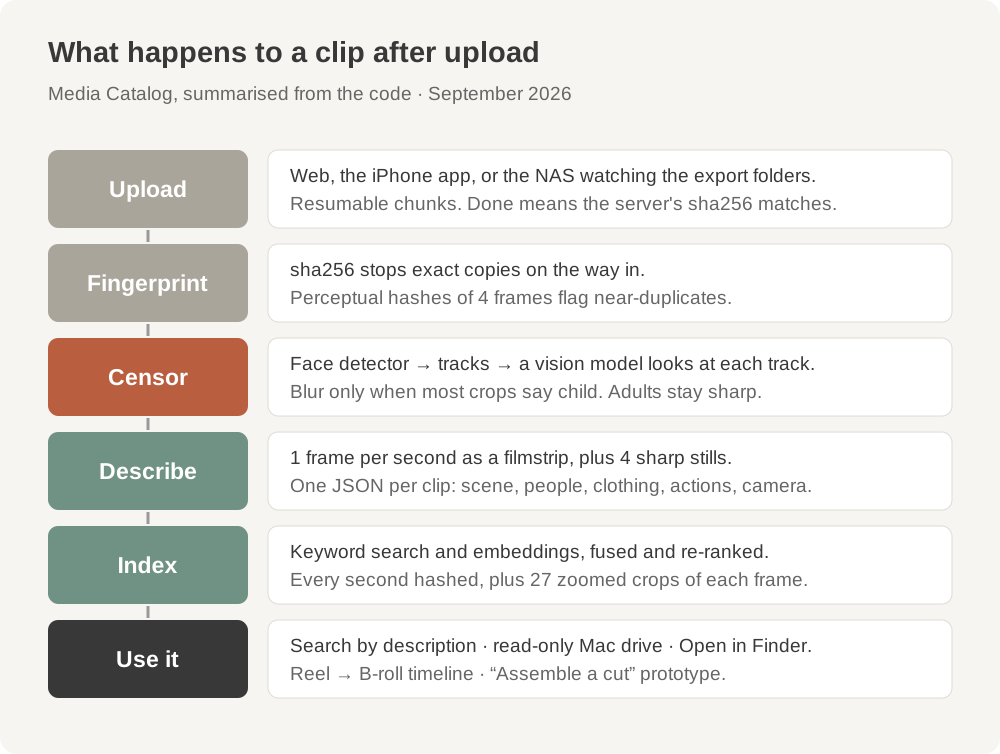
Every upload gets fingerprinted: a hash of the whole file so exact copies stop at the door, and perceptual hashes of a few frames to catch near-duplicates from years of copying files between drives. Every second of every video also gets its own fingerprint, plus 27 zoomed-in crops of that frame, because editors scale B-roll up and a zoomed shot should still match.
Then the faces. A face detector finds every face and tracks it through the clip, and a vision model looks at each track and decides whether it's a child. Only children get blurred. Faces it can't decide on get flagged for a person to look at.
Then a vision model watches the clip as a filmstrip, one frame per second with each frame labelled by its timestamp, plus four sharp stills. It writes one structured description per clip, roughly this shape (the field names are from the code, the values are made up):
{
  "description": "Toddler in yellow overalls crawls across foam tiles toward a red ball",
  "tags": ["crawling", "indoor", "ball", "floor-play"],
  "scene": { "location": "nursery", "lighting": "warm lamp light", "surfaces": ["foam tiles"] },
  "subjects": [{ "who": "toddler", "clothing": "yellow overalls", "actions": ["crawling", "reaching"] }],
  "objects": ["red ball"],
  "camera": { "angle": "low", "movement": "static", "framing": "wide shot" },
  "action_summary": "Starts seated, rolls onto hands and knees, crawls two metres and grabs the ball."
}
Search runs keyword matching and meaning-based matching at the same time, merges the two, and lets another model re-rank the top results.
Footage gets in from the website, from the NAS watching our export folders, and from an iPhone app. The app uploads in the background, so it keeps going when the screen locks, and it checks each file's fingerprint against the library first so nothing goes up twice. It can also search the approved footage and save a clip straight to Photos, and its share extension is how posts get from Instagram into the Analyzer.
There's a longer write-up of how the library started in Media Catalog.
Every reel, traced back to its footage
Before anything can cut the way we cut, it helps to know how we've been cutting.
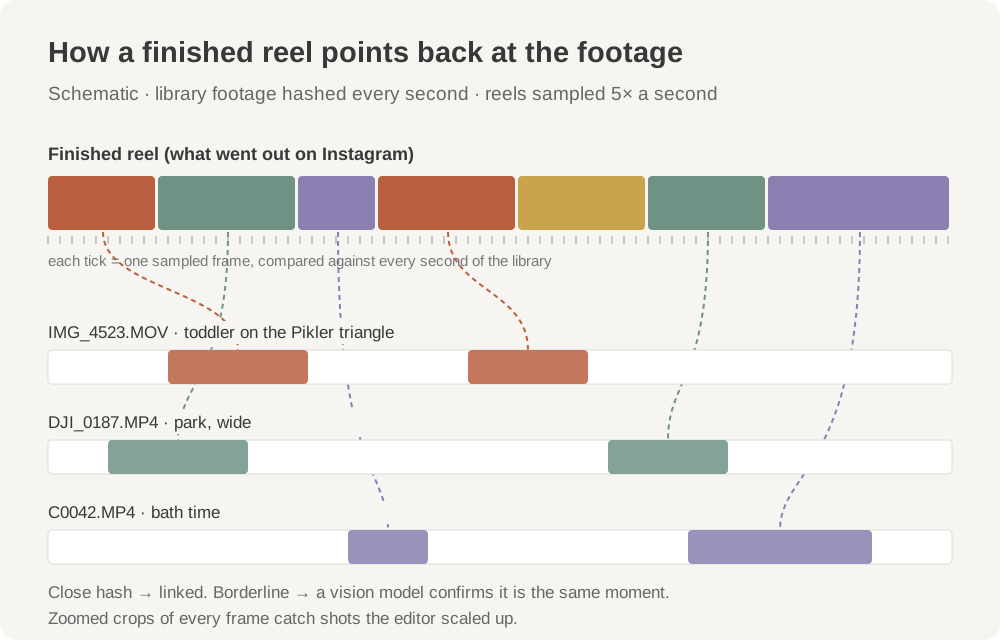
So the library can take a finished reel and tell you which clips it used, and at which second. Of the 190 finished reels in the library, it matched 158 back to their footage: 2,515 links to 410 clips. When a reel works, I can see exactly which B-roll it was built from, and every raw clip shows every reel it has ended up in. It's the first real map of how our edits are actually put together.
How the matching works
The reel gets sampled five times a second, and every sample is compared against the per-second fingerprints of the whole library, including the zoomed-in crops, so a shot that was scaled up in the edit still matches. Close matches link automatically. Borderline ones get checked by a vision model looking at both frames. The spot checks I did by hand came back right.
Claude, plugged into the library
This is the newest piece, and my favourite.
MCP is the standard way to hand an AI assistant a set of tools. I wrote a small MCP server for the library, so Claude (or Cursor, or Codex) can work with our footage directly. It gets five tools:
find_media        search by meaning, or filter by kind, child, country and date
get_media         everything known about one clip or photo
view_media        up to eight thumbnails, as images the model can look at
get_media_file    the file itself, trimmed to exact frames, resized, or as a still
library_overview  what's in the library, at a glance
It signs in with the same per-person password as the Finder drive, so it sees exactly what that person sees on the website and nothing more: only the blurred masters, and "son" and "daughter" instead of names for anyone who isn't family. It can't change or delete anything. It also tells the AI up front that these are private family videos that don't leave the workspace.
In practice I can ask Claude for "a few seconds of him climbing, no dad in shot" and it searches, looks at the thumbnails, and trims the right part straight into whatever project it's working on. Claude already knows how to read a script and reason about what each line needs. What it was missing was eyes on our footage. That's the part of the editor that just started to exist.
The first rough cut
"Assemble a cut" is the first time the library makes something instead of only finding something.
You type what you want in plain words. The library ranks the candidate clips, a model picks the exact cuts (which clip, where to start, where to stop), and ffmpeg trims and joins them from the approved, blurred masters. Up to eight shots, a minute at most. The result is saved as a reel with its source timecodes, so it's traceable like everything else.
It's a prototype. It doesn't follow a script line by line yet, there's no voiceover or music, and nothing comes out as a Premiere timeline. That's the next part: a script goes in, Claude picks shots through the MCP, and a first cut comes out that an editor can finish.
A drive for the editors
This one came from a very ordinary problem. Our editors wanted the footage on their own machines. The footage lived on our NAS, which goes offline at night, and the paths were never the same from one machine to the next, so their projects kept breaking.
So the whole library now mounts on a Mac as a read-only drive called BA-Catalog, with Videos, Photos, Content and Course folders. Each person sees exactly the files they're allowed to download: blurred, approved masters only, with "son" and "daughter" instead of our kids' names for anyone outside the family. Find a clip on the website, click Open in Finder, drag it into Premiere. Nobody relinks media because someone reorganised a folder.
Video Cleaner
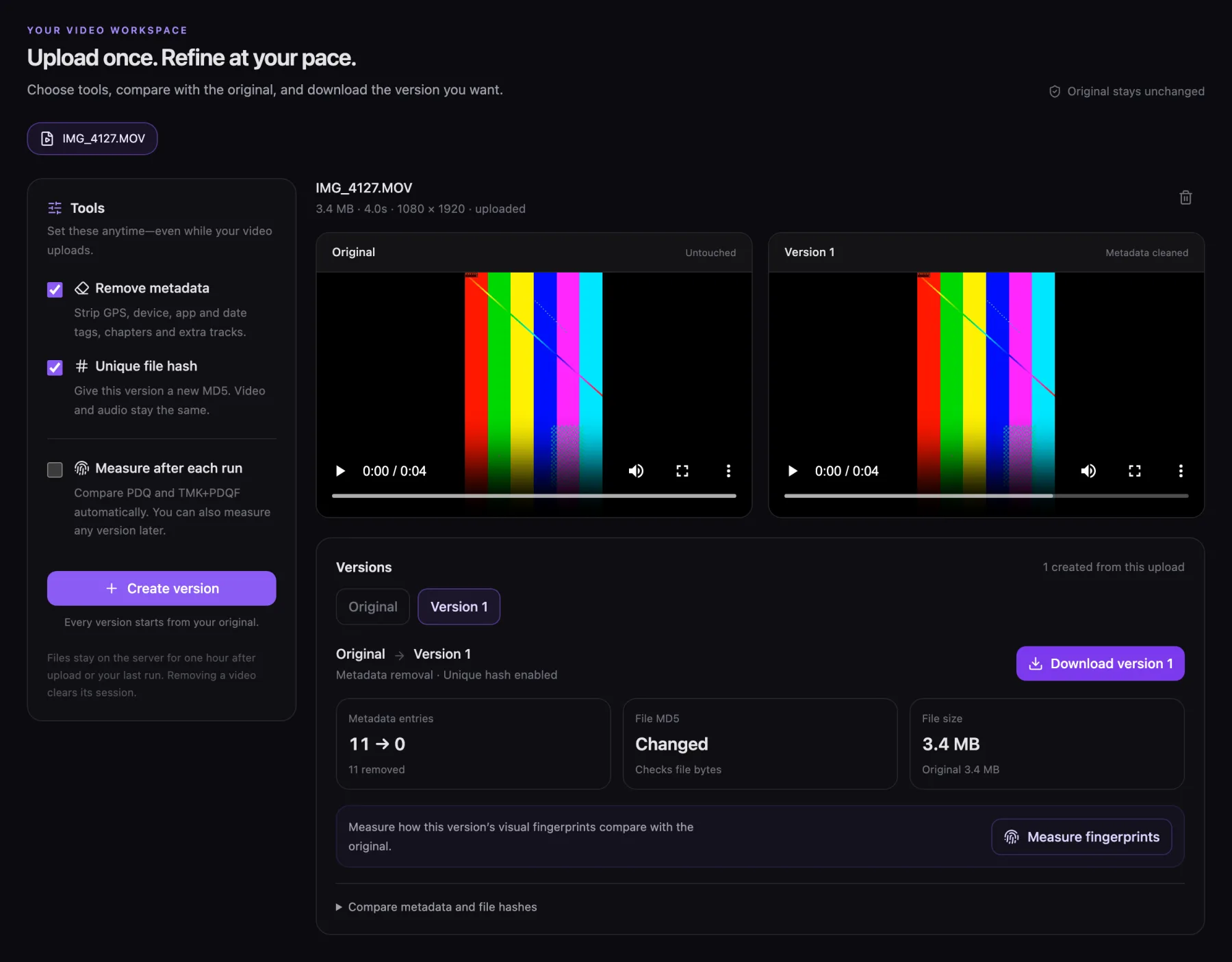
Before a video gets posted, I want everything the phone wrote into the file gone: where it was filmed, which phone, which app, when. Video Cleaner strips all of it without re-encoding, so the picture doesn't change. It can also give the file a new, unique hash, which changes the bytes and not the picture. One video or a batch, and the copies delete themselves from the server after an hour. It does the jobs of Metadata++ and HashManager in one place.
What exactly gets removed
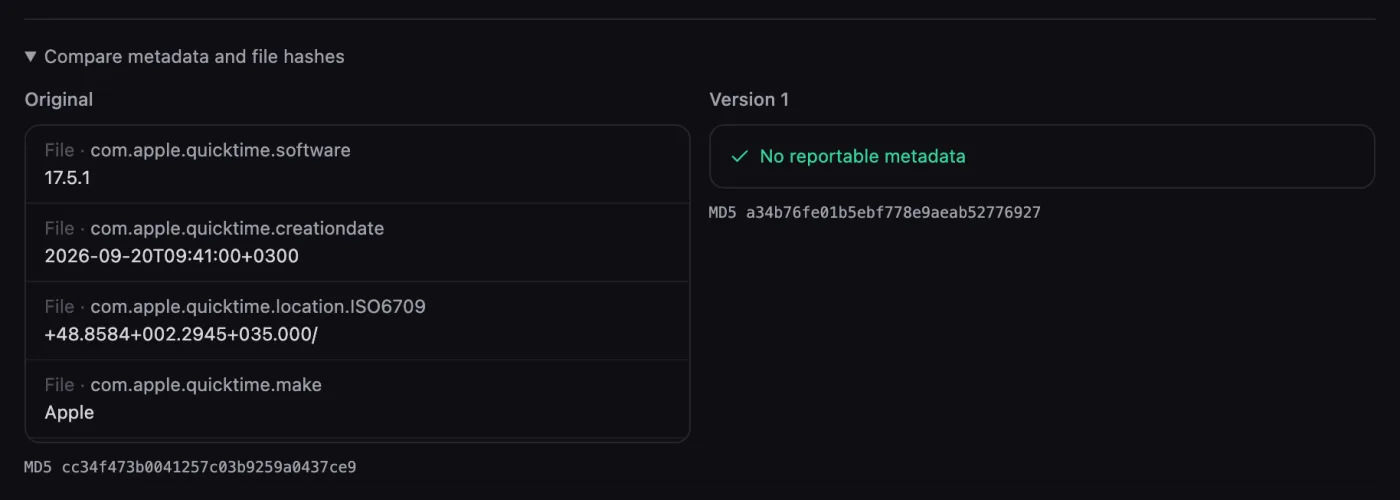
All container metadata goes: GPS, phone make and model, app and software tags, dates, comments, chapters, cover art and extra data tracks. Only the video and audio streams stay, copied as they are, so rotation and HDR information survive.
The newest addition measures the visual fingerprints before and after, with Meta's open-source PDQ and TMK+PDQF, so I can see what a clean actually changes. That's out of curiosity. It doesn't tell you what any platform will decide.
Instagram Analyzer
This started as a place to dump posts I found interesting and turned into the tool I use to decide what to make next.
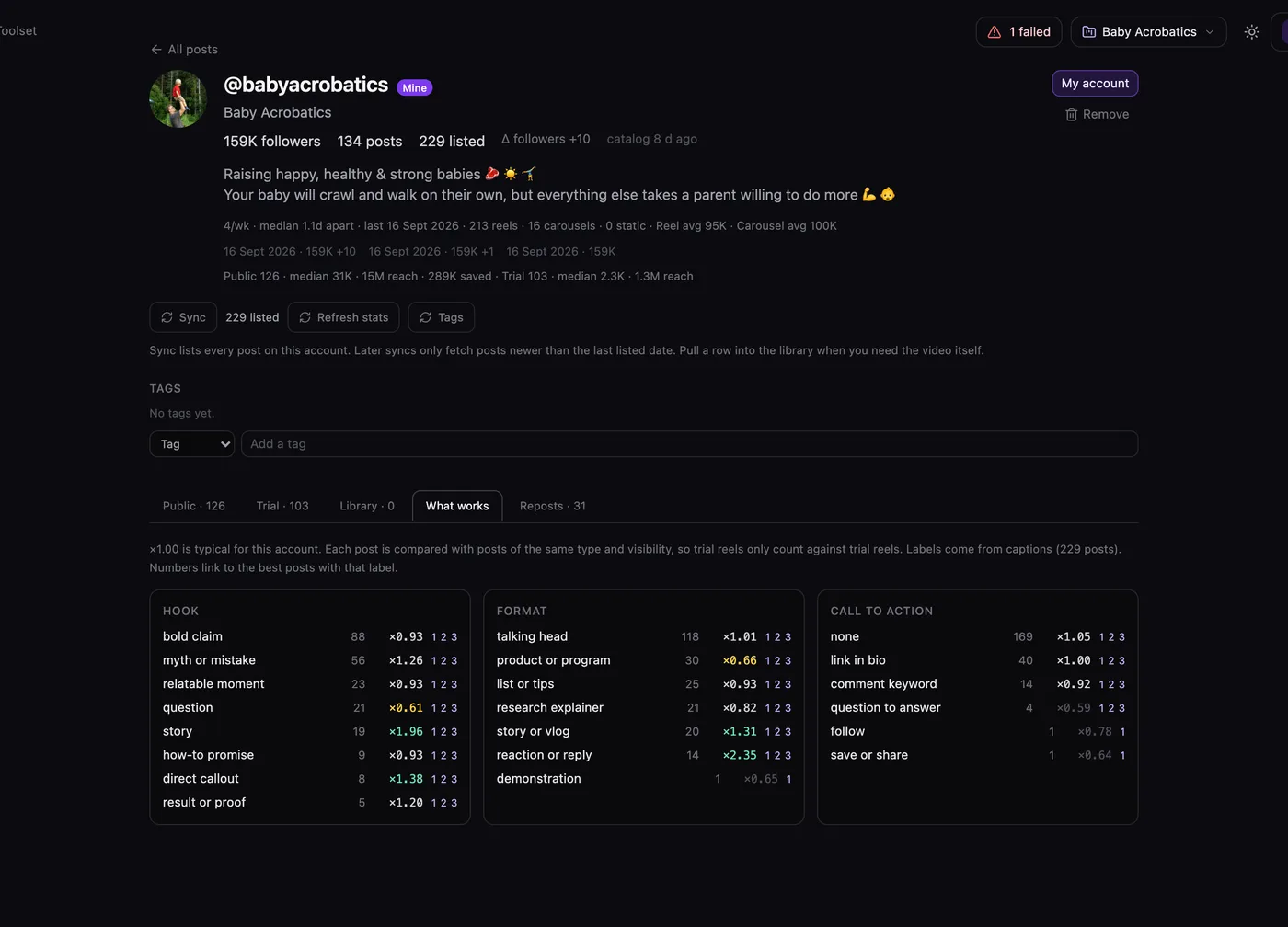
The tab I use most is What works. Every post gets labelled with a hook type, a format and a call to action, and every label gets scored against the account's typical post. "Myth or mistake" hooks on our account run at about ×1.26, questions at ×0.61. That's an argument I can actually have with myself, instead of going on a feeling about the last three reels.
The other part I rely on is the comment triage, which pulls out the actual questions people are asking. That's where a lot of our content ideas come from.
How posts get in, and how the numbers work
You paste a post link, or a whole profile. On my phone it's Share → Creator Toolset from inside Instagram. Each post goes through a small pipeline: stats, the media, a transcript of every video slide, the text on the slides, up to a thousand comments, AI tags, and a one-line "idea" that files it under a topic. For other people's accounts it scrapes through Apify or a separate login. For our own account it uses Instagram's official API, which also knows the difference between public reels and trial reels.
The multiplier: each post's views are divided by the median for comparable posts on the same account, so a trial reel is only compared with other trial reels. Then each label gets the median of that.
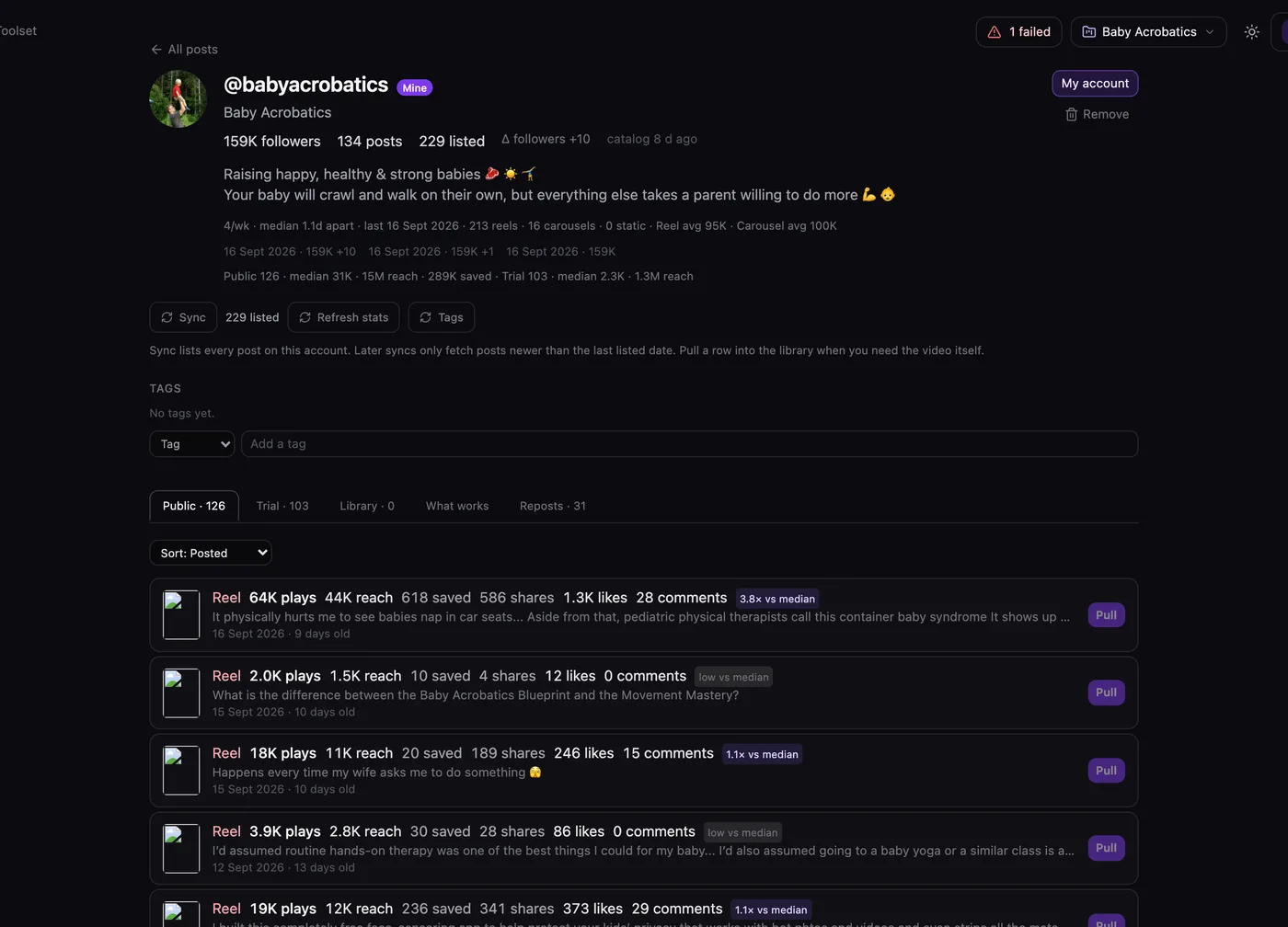
There's also search across captions, transcripts and comments, and an analysis page for hooks, posting cadence and reposts.
Content Workshop
The Workshop is where the research turns into a script.
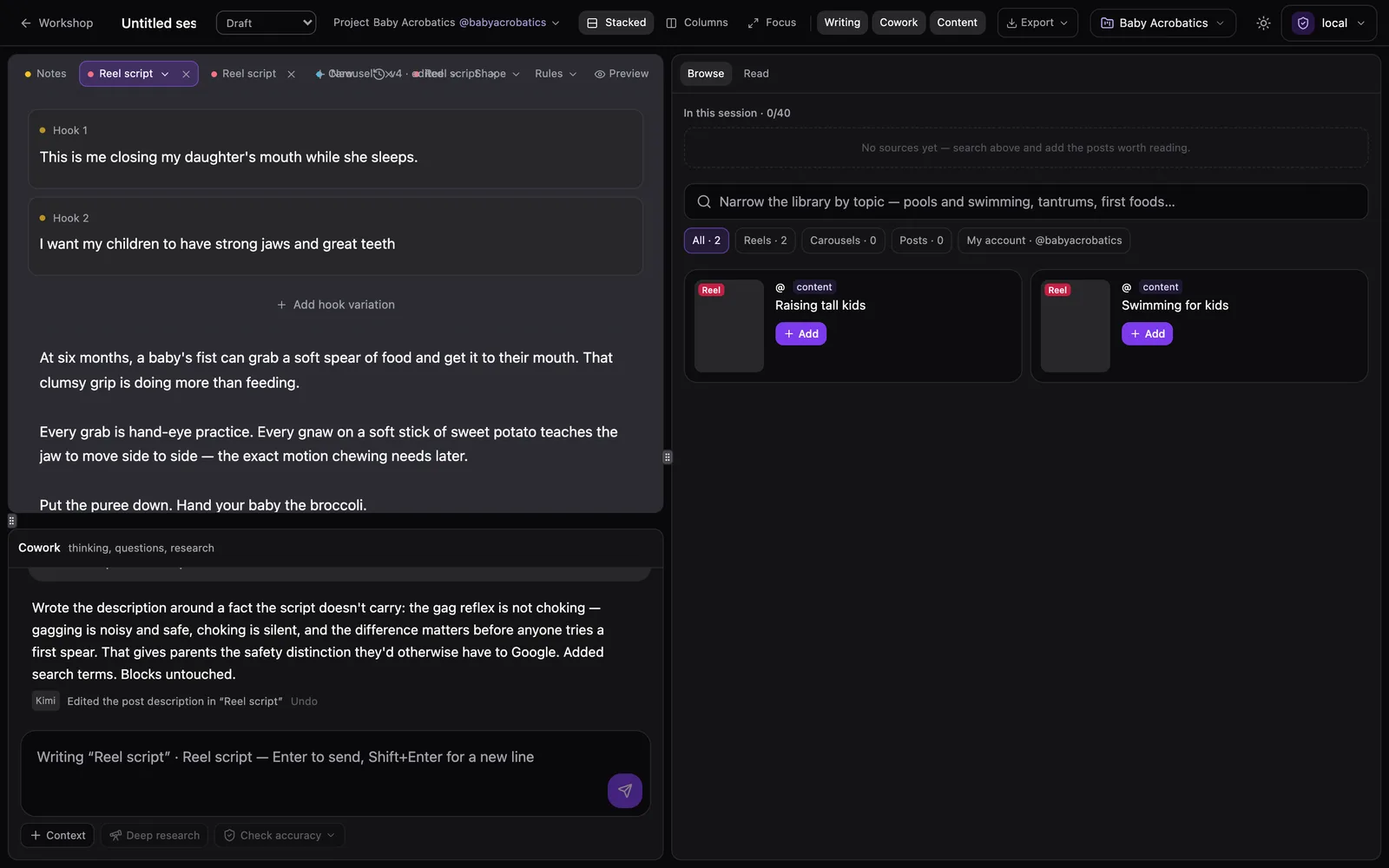
The draft is a shared document that the AI and I both edit, and it keeps track of which lines are mine. It won't rewrite my lines unless I tell it to. The Analyzer's library sits next to it, so I can pull a post in as a source and highlight a sentence to drop it into the conversation. A "Check accuracy" button sends the script out for fact-checking, and every claim comes back with a verdict, sources, and a one-click fix. The project remembers who the audience is, the voice, and the call to action, so I'm not explaining Baby Acrobatics to a language model every morning.
Frameworks and writing rules
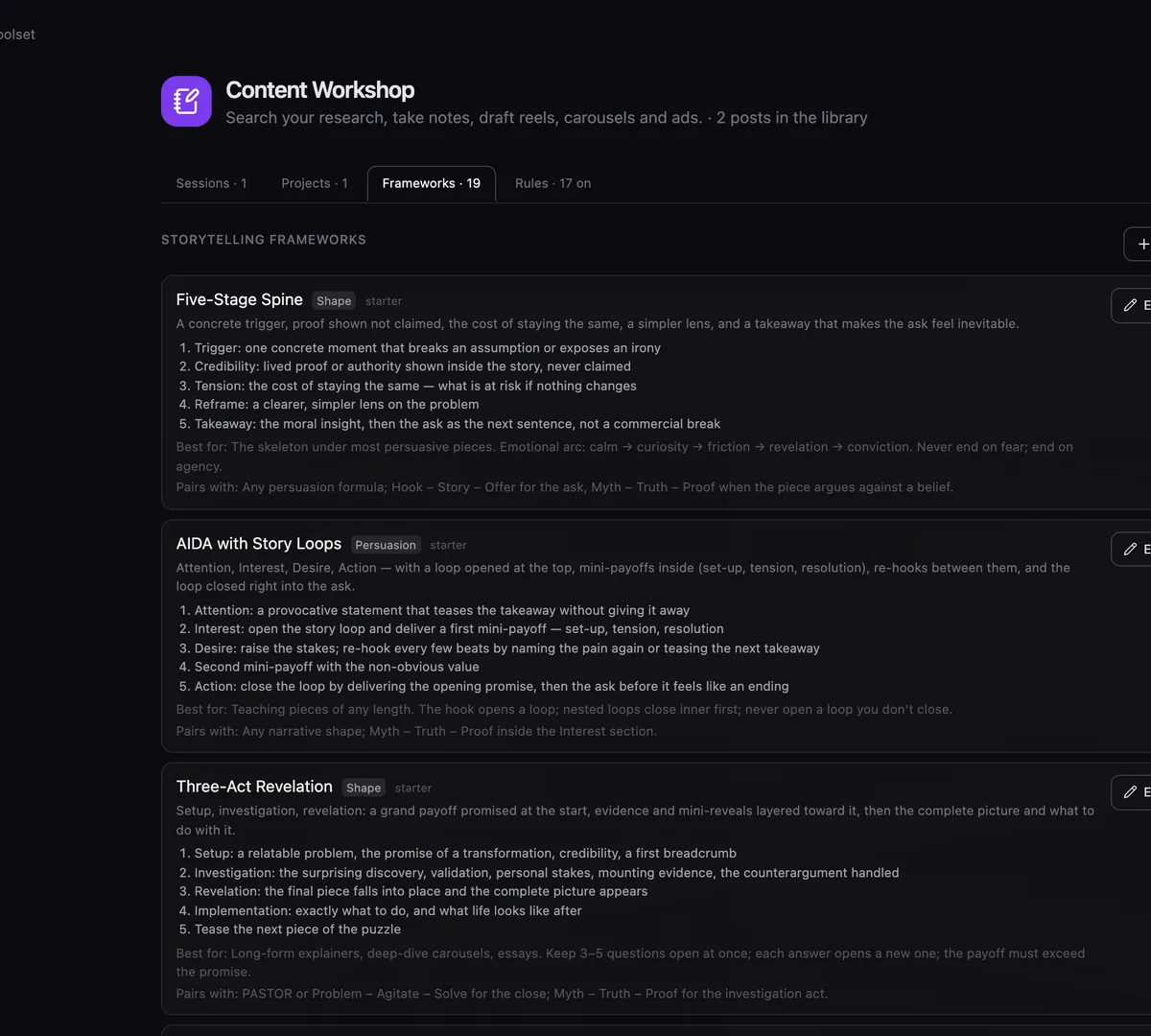
There are nineteen storytelling frameworks to shape a piece and seventeen rules I care about ("but/therefore, not and-then", "no engagement bait", "open with substance"). After each AI turn the draft is checked against whichever rules are switched on. It can also do its own research before it writes.
Review
My Frame.io. It's one of the newest, built this week.
An editor sends me a cut, I watch it, and then I have to describe where the problem is. "Around 0:12, when he says 'window', the caption is on top of the highlight." Frame.io solves this beautifully and is priced for companies that have producers. I have me.
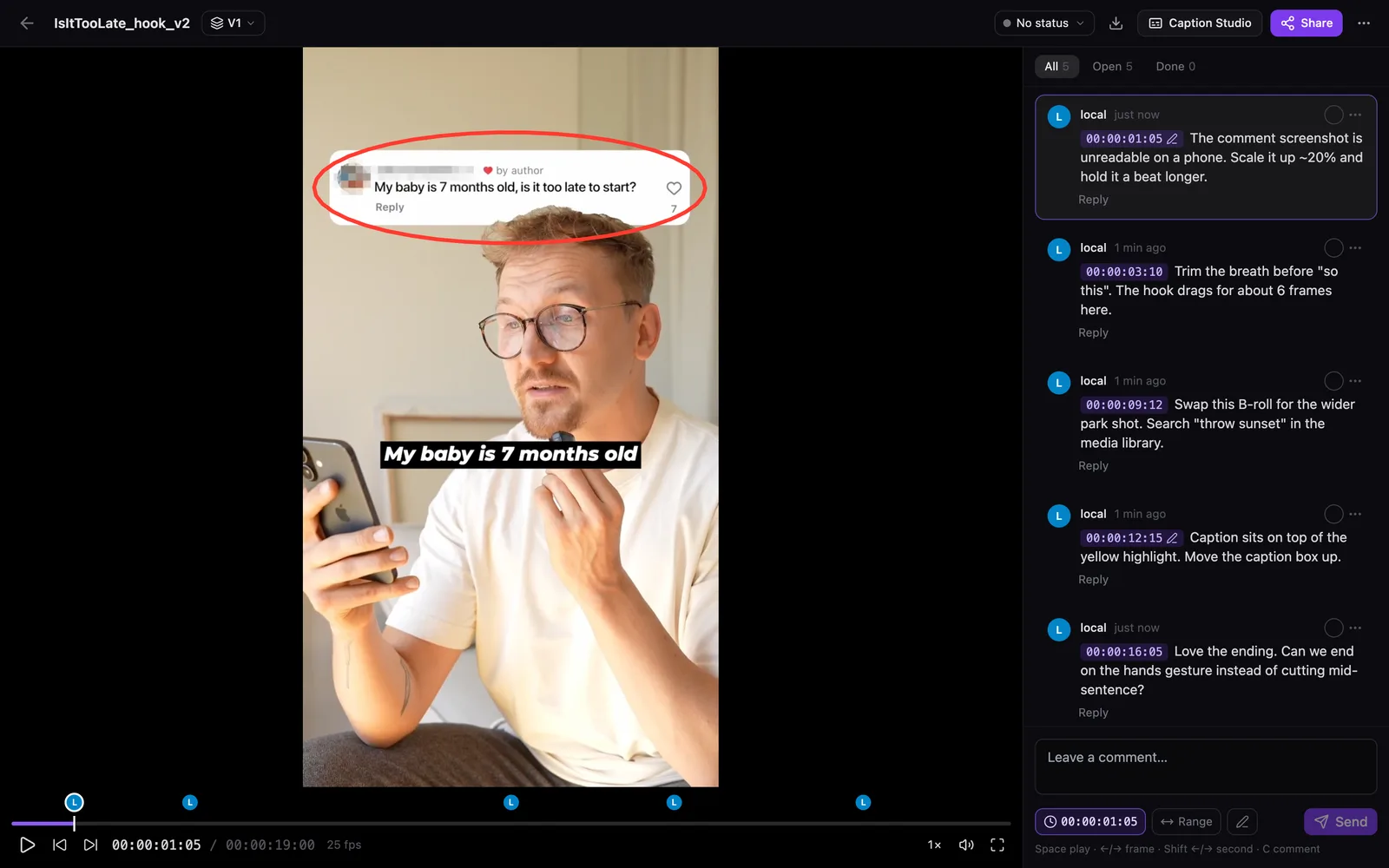
Comments are pinned to the exact frame, and you can draw on the frame to point at the thing. The share link is the point: whoever opens it doesn't need an account. They type a name, watch, comment, and press Request changes or Approve. It's also wired into Caption Studio, so I can open a version there to caption it and send the captioned export back as the next version.
The details
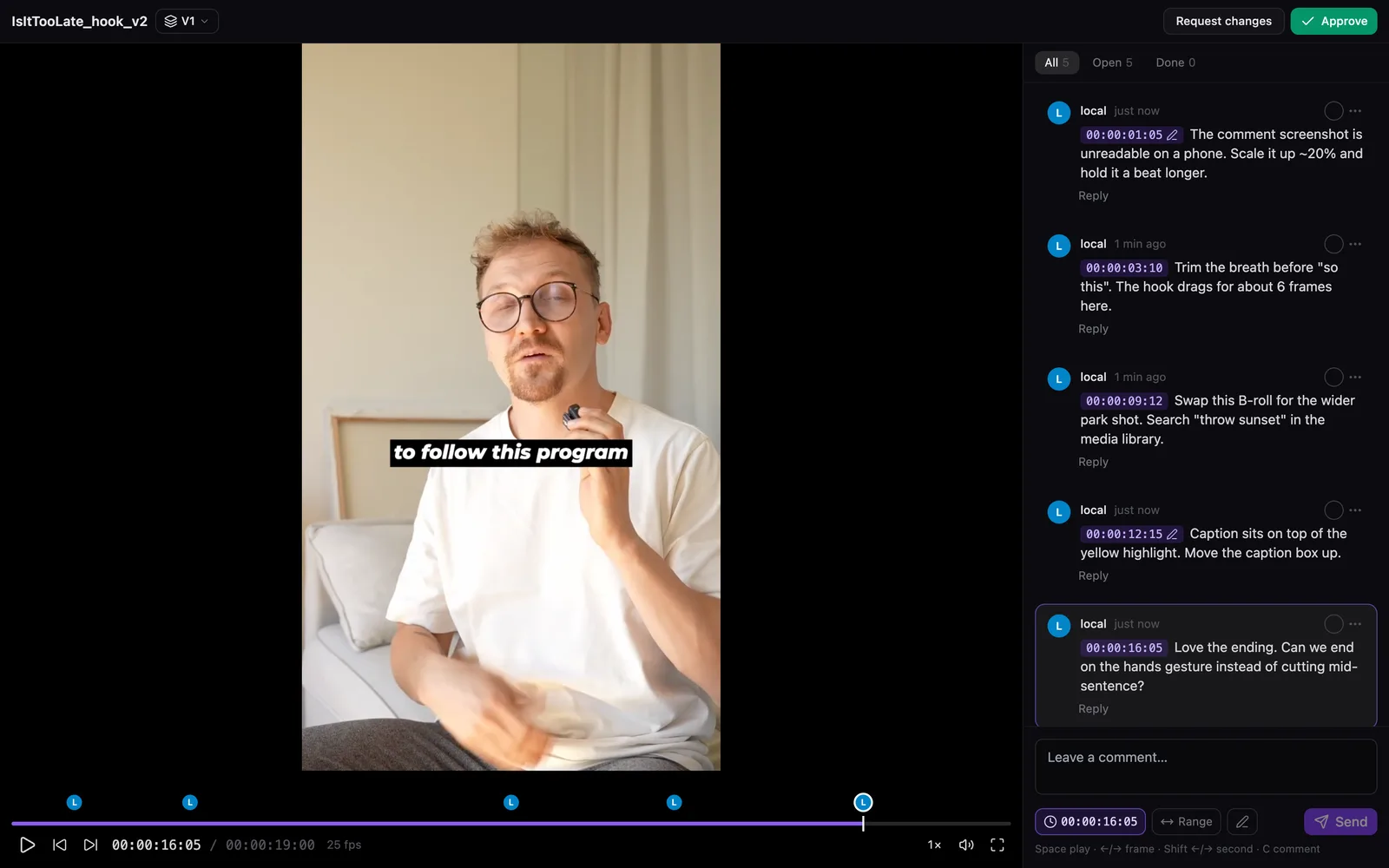
You drop in any video. If a browser can't play it (ProRes, HEVC, 10-bit) the server quietly makes a web copy. Comments use HH:MM:SS:FF timecode and can cover a range. The arrow keys step one frame, C starts a comment. Replies, "mark as done", new versions stacked on the same card, and a CSV export of every comment for editors who work from lists. I can switch the share link off, reset it, or allow downloads.
Video Notes and Guide Builder
This is the Loom-plus-Notion workflow I actually wanted. I explain something once, out loud, the way I would to someone sitting next to me, and I end up with a page they can follow without watching me talk for ten minutes.
To show it, I took the one-minute Caption Studio walkthrough from further down this page and dropped it into Video Notes.
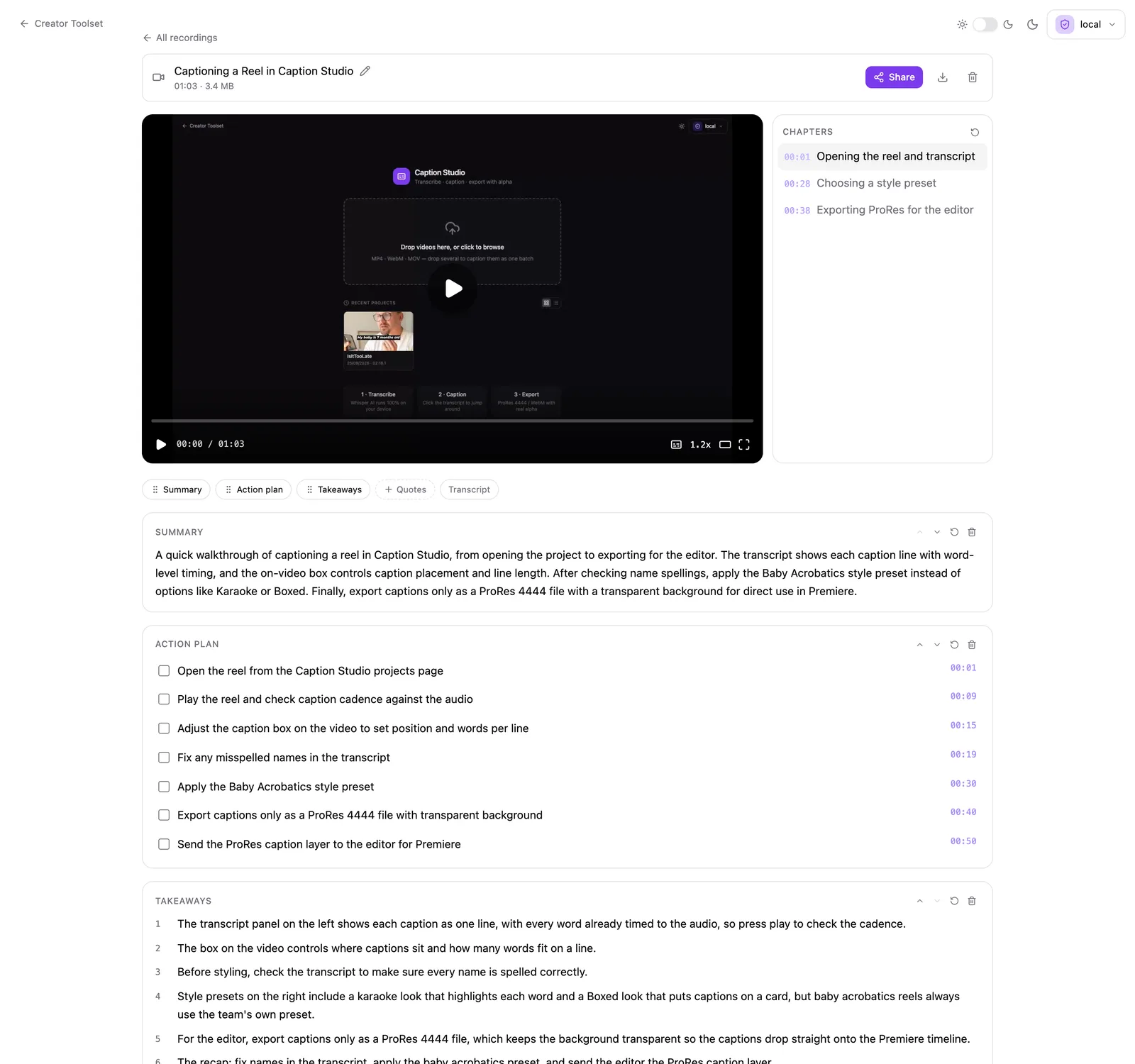
It came back with a title, a summary, three chapters, and an action plan where every item links to the second I said it. "Export captions only as a ProRes 4444 file" jumps to 0:40. The transcript sits underneath, with a clean-up button that removes the ums and fixes words the speech recognition misheard.
Then I opened Guide Builder, picked the same recording and asked for a guide.
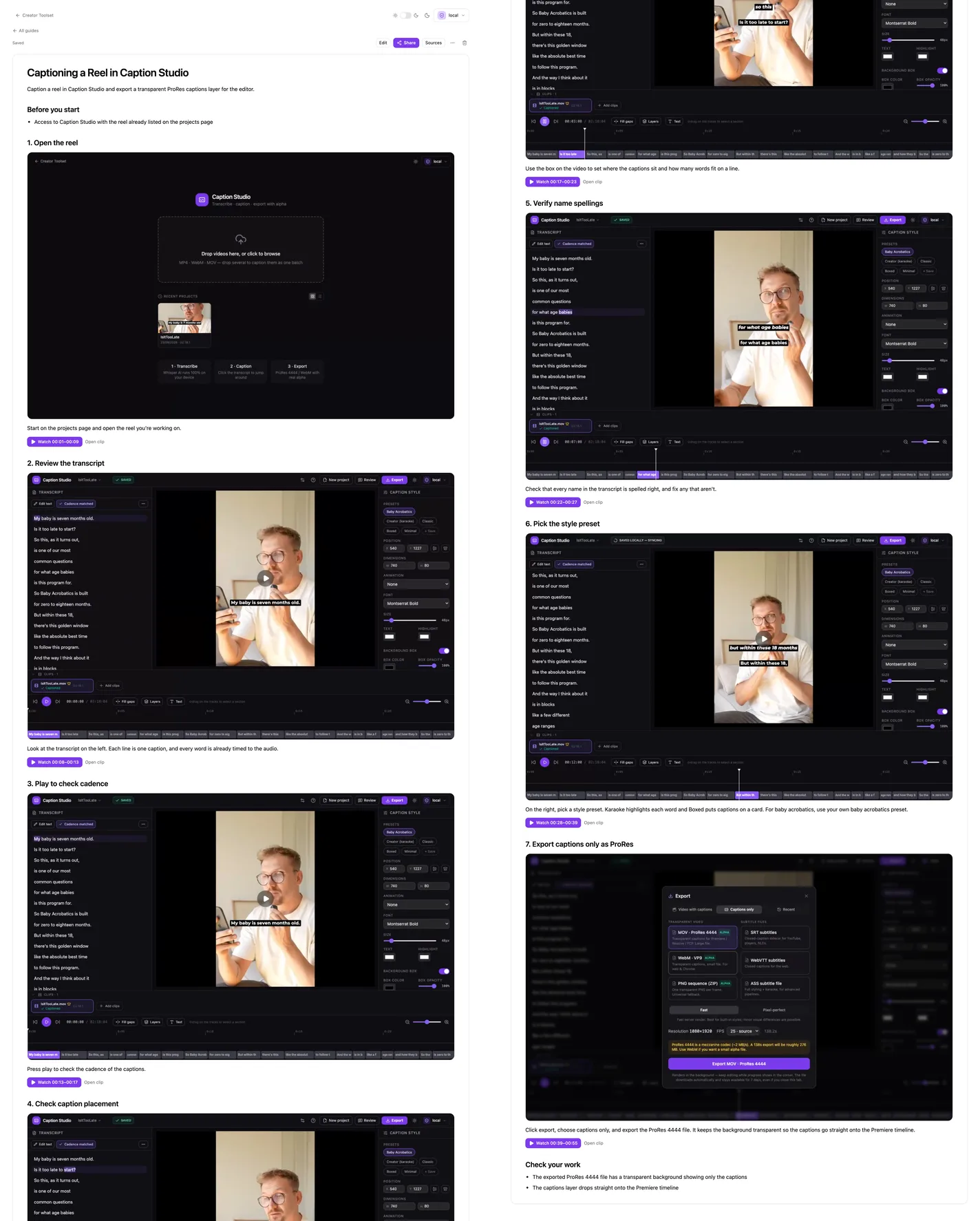
Seven steps, each with a screenshot pulled from the video and a "Watch 00:39–00:55" link that plays exactly that part, plus a "Before you start" section at the top and "Check your work" at the end. I can edit it like a normal document and share it with one link. Before this, the SOP was the thing I kept meaning to write after the Loom. Now it gets drafted from the Loom, and I fix whatever it got wrong.
Caption Studio
This is where the web tools started.
I paid Descript €30 a month for four years. I wasn't even captioning that much. A few videos a month, usually several versions of the same thing, and somehow I kept ending up in a fight with the caption box. So in July I built my own.
For this page I recorded a one-minute walkthrough: open a reel, check the captions, pick a style, export the transparent layer for the editor. The voice is text-to-speech. The reel on screen is one of ours.
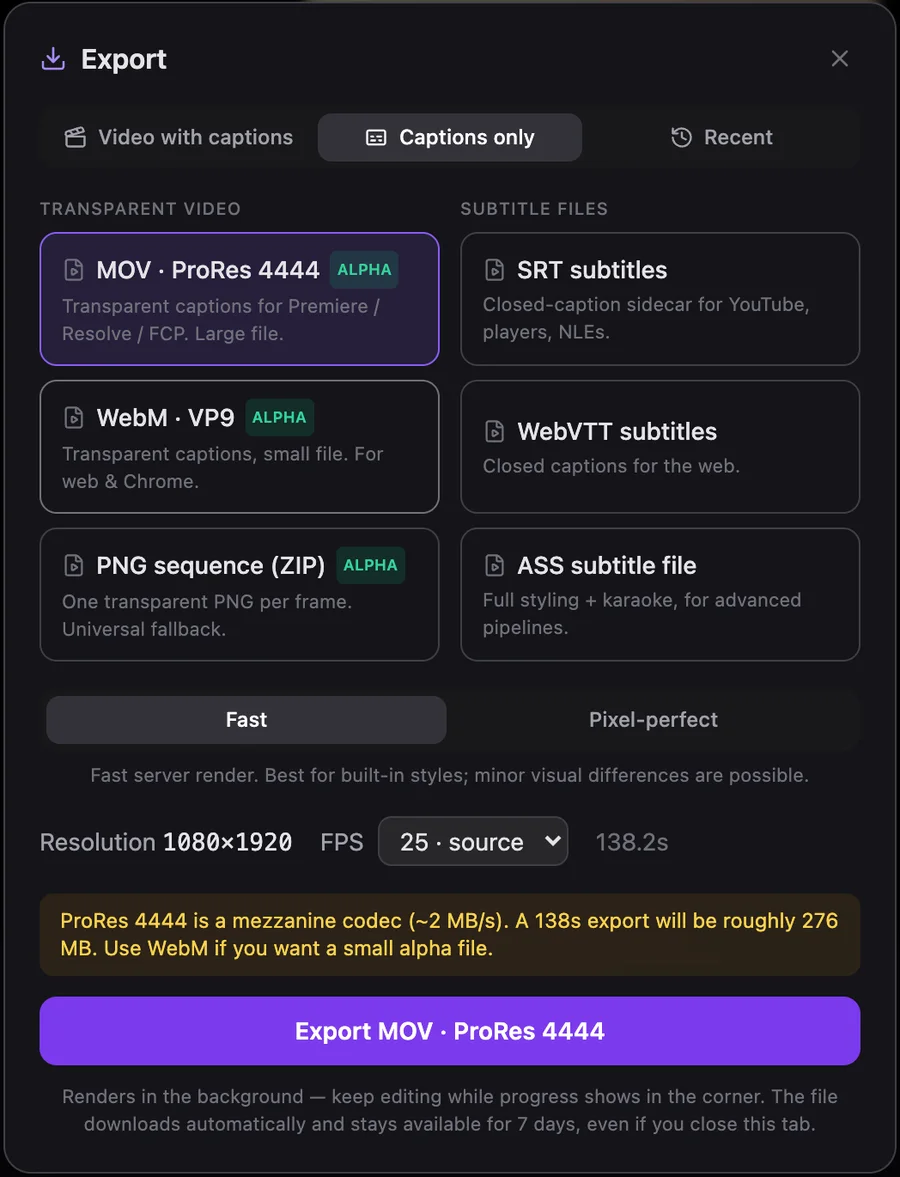
Two things make it mine. I caption in batches, several cuts of the same reel with different hooks, so I fix the first one and apply those fixes to the rest. And the export I actually wanted is the captions on their own with a transparent background, as one more layer on the Premiere timeline.
For this particular workflow, I like my version better. I'm not claiming it does everything Descript does. I just no longer pay for the part that was frustrating me.
How it works
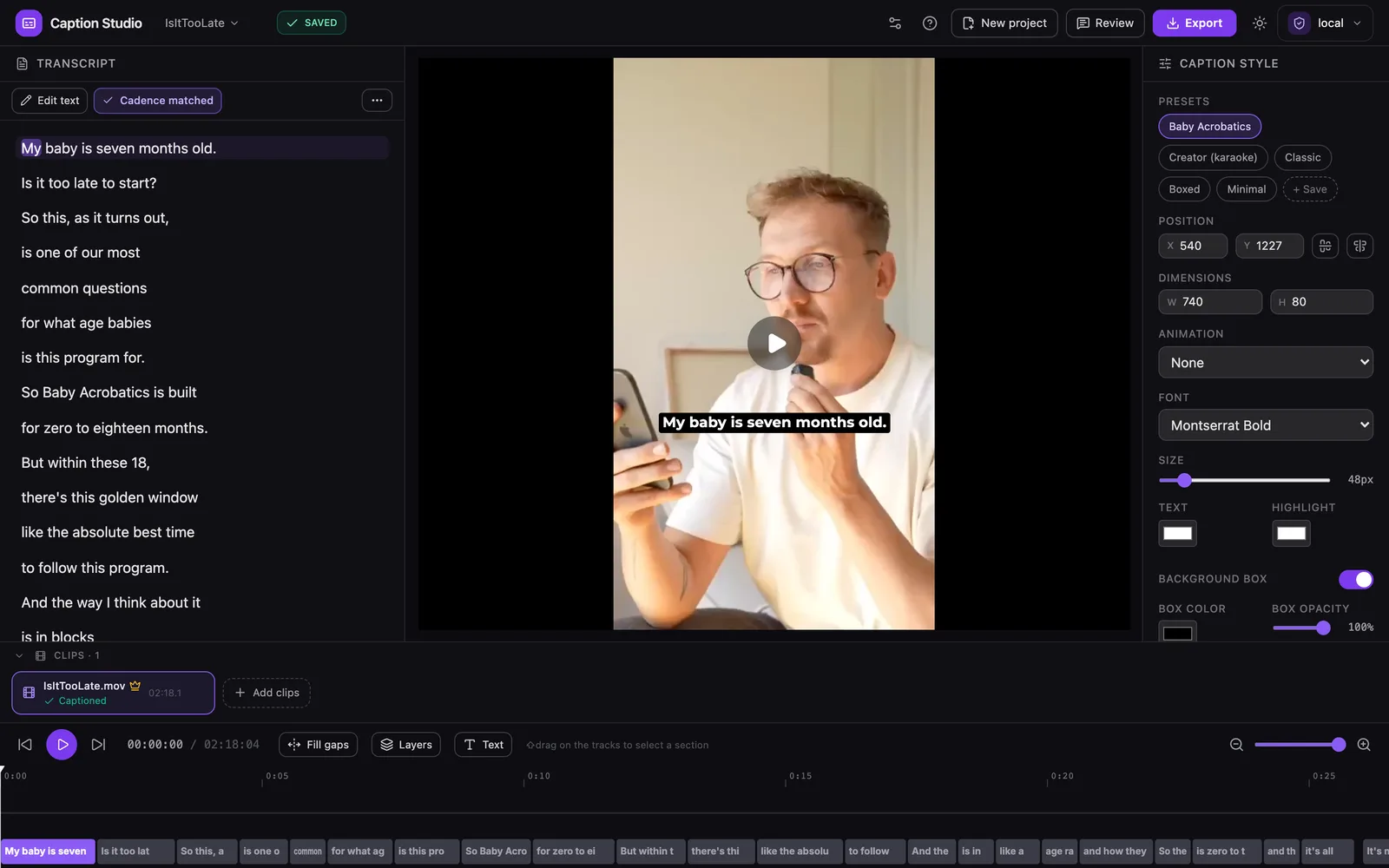
Transcription runs locally in the browser with Whisper, or in the cloud with Deepgram. Long files go to Deepgram in overlapping 45-second windows that get stitched back together, because on long recordings it would sometimes drop a whole section.
The transcript works like Descript's: every line is a caption, the words are timed to the audio, and editing text doesn't break the timing. Two AI passes do the tedious bits. "Match cadence" regroups the transcript into one spoken thought per line, the way I'd break it by hand. The model rewrites the lines, and then plain code matches them back to the real word timings, so the AI never gets to invent a timestamp. "Script check" fixes the names and words the transcription got wrong, using the script you filmed from. It's only allowed to use words that are in the script, and it underlines every fix so you can check it.
The caption box is dragged and resized on the actual composition. The footage already exists; I don't want to rearrange the edit around whatever the caption tool thinks is a good default.

Applying the master works out what changed between the master's original transcript and my corrected one, and replays those edits on each version, with a badge showing how much of it matched. If I've already decided how to spell a word and where the line breaks, I shouldn't have to decide it five more times because the hook changed.
You can also burn captions into an MP4 (H.264 or H.265, rendered on the server or right in the browser). The captions-only exports are ProRes 4444 with alpha, WebM with alpha when size matters, a PNG sequence if all else fails, plus SRT, WebVTT and ASS.
Audio Enhancer
This one is the least original. The first version ran an open-source noise-reduction model through a chain of ffmpeg filters, and it was okay. Then I switched the core to ElevenLabs' voice isolation, which is better at pulling a voice out of a room than anything I was going to build myself.
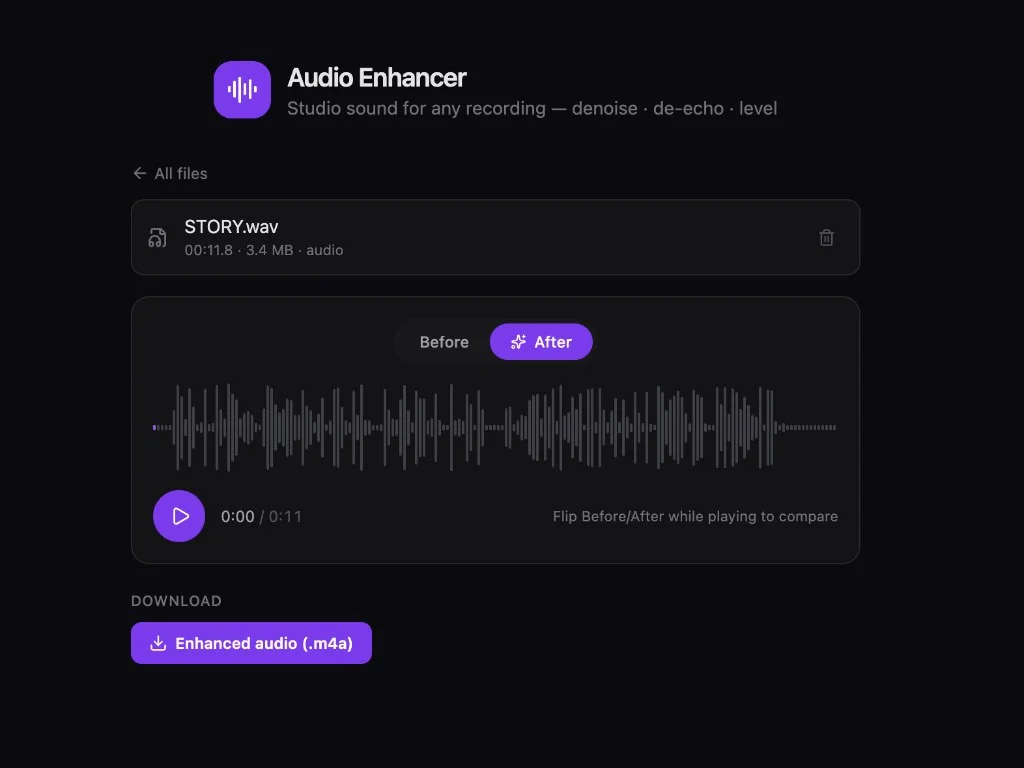
What I built is the part around it. Drop in audio or a whole video, it gets cleaned and levelled to a consistent loudness, and a Before/After switch flips between the two at the same playhead position. I'm not going to pretend it's better than Adobe Podcast. It just means the cleanup happens in the same place as everything else, instead of in yet another tab with yet another login.
How it got built
The library started in February as a command-line script and a small Flask app. Caption Studio's first commit was on the 24th of July 2026. Video Notes and Guide Builder followed on the 1st of September, the Analyzer and the Workshop in mid-September, and on the 24th everything moved into one repository together with the iPhone app. Review, Video Cleaner and the MCP server are from the 25th. The web tools are around 85,000 lines of TypeScript with 800-odd tests. The library is around 50,000 lines of Python with another 660-odd.
A lot of it was written together with AI coding agents. My part was deciding what each thing should do, using it every day, and being annoyed at it in very specific ways until it stopped being annoying.