Media Catalog
Baby Acrobatics is what I actually work on. Baby development, movement, kids hanging from bars and climbing things that make other parents nervous. App, community, a lot of video.
We've got hundreds of thousands of followers across social. We're putting videos out constantly - reels, stories, B-roll, the finished pieces. That's a lot of files. And a lot of people who need some of those files and absolutely should not have others.
An editor pulling B-roll. A freelancer who can download the censored version and nothing else. Someone on the team who uploads. You can't run that out of a shared Drive. We needed a way to organize the media and hand specific things to specific people.
And because the kids are in the videos, there's another constraint. We cover their faces in the content we publish. That has to remain true when other people work on an edit, not just when I'm the one checking it.
Which means every time an editor reuses a piece of B-roll they have to censor the faces again. From scratch. Manually. Even if it's a clip we've used fifteen times before and censored fifteen times before because the source file is uncensored & nobody knows which version was the censored one or where it lives or if it even still exists. Every edit starts with this re-censoring process that just... shouldn't exist.
And then finding anything.
We have somewhere between 500 and 1000 clips of B-roll. All shot over months across different cameras & different locations. And the way you find a specific clip is you go "I remember there was this clip of him eating meat in a red shirt" and then you open a folder with 400 files named IMG_4523.MOV through IMG_5891.MOV and good luck.
You don't know the filename. You don't know which folder it ended up in. You just remember what was happening - what he was wearing, what he was doing, where it was shot. And there's no way to search for any of that because file systems don't know what's inside a video file.
Finding a single clip could take 20 minutes of scrubbing through footage. Multiply that by every clip needed for every edit and the search process was eating more time than the actual editing. The biggest bottleneck in the whole production workflow wasn't shooting or editing - it was just finding the right B-roll.
And then there was the chaos problem.
B-roll would end up in random folders. Different editors would pull clips onto different drives. Someone would reorganize things and now the paths are broken. Another editor tries to pick up a project and half the media is offline because the clips moved. You spend twenty minutes relinking everything & praying the file names match. Just a mess - every handoff between editors was a disaster waiting to happen.
So I built a media catalog.
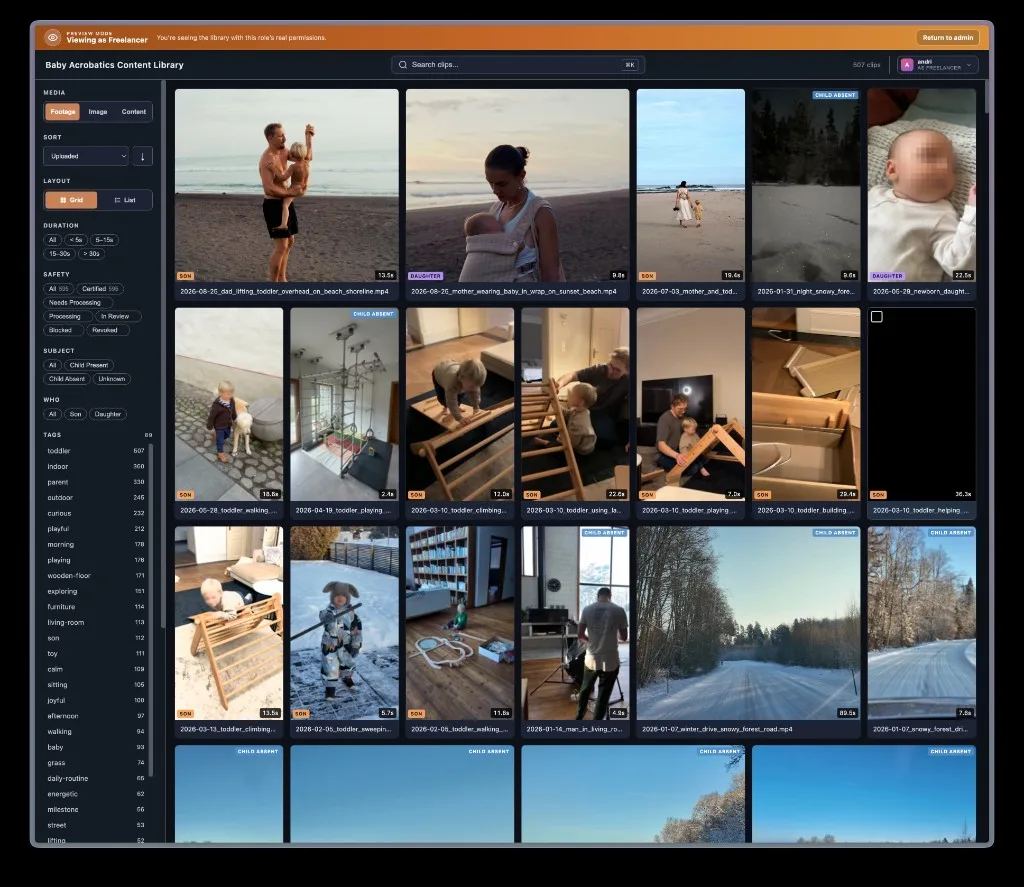
That's the library. The orange bar is me checking what a freelancer can see, which is a smaller selection of files than an admin gets. I'll come back to the permissions, because those turned out to matter just as much as the search.
The other part is published content. Finding a piece of B-roll and finding the exact export that went out on Instagram sound similar until you're dealing with a folder full of almost-identical versions. The catalogue handles those as different jobs.
how it works
You drop videos in the inbox. It samples frames, builds a filmstrip, and uses a vision model to describe what's happening: who's in the frame, what they're wearing, the setting, and how the action develops across the clip. Those descriptions become tags and searchable notes, with embeddings so you can search by meaning as well as exact words.
That gives the catalogue something a file browser doesn't have: information about what's actually inside the file. A useful description can tell you that a toddler is climbing a Pikler triangle in a red shirt. IMG_4523.MOV tells you approximately nothing.
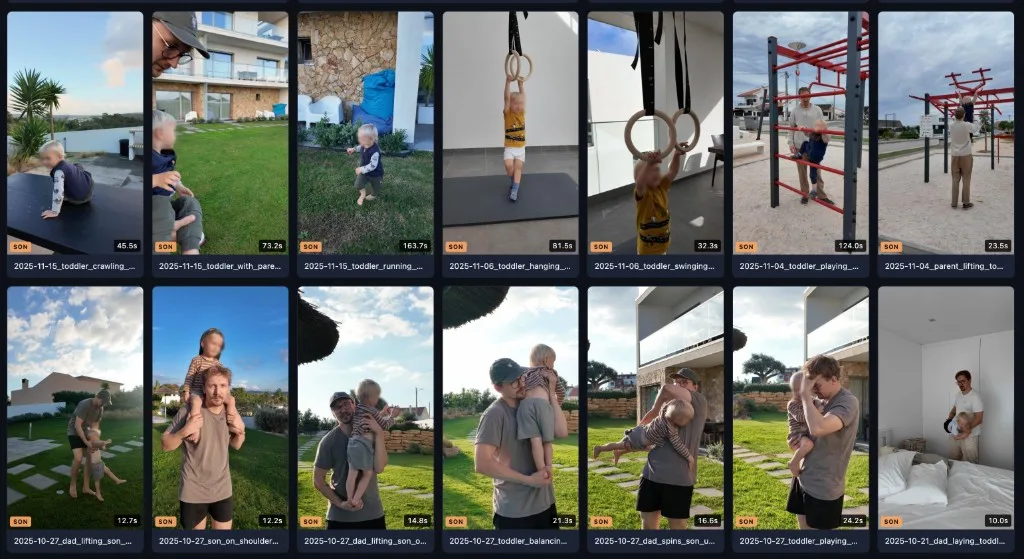
Everyday view is a grid. Duration on the thumbnail. Who's in it. A name that describes the clip. Faces already blurred on the preview, because even the catalog shouldn't be leaking anything.
the search
The search is hybrid - full-text (exact and prefix, across descriptions, filenames, tags, action summaries) plus semantic search over the embeddings. ⌘K from anywhere.
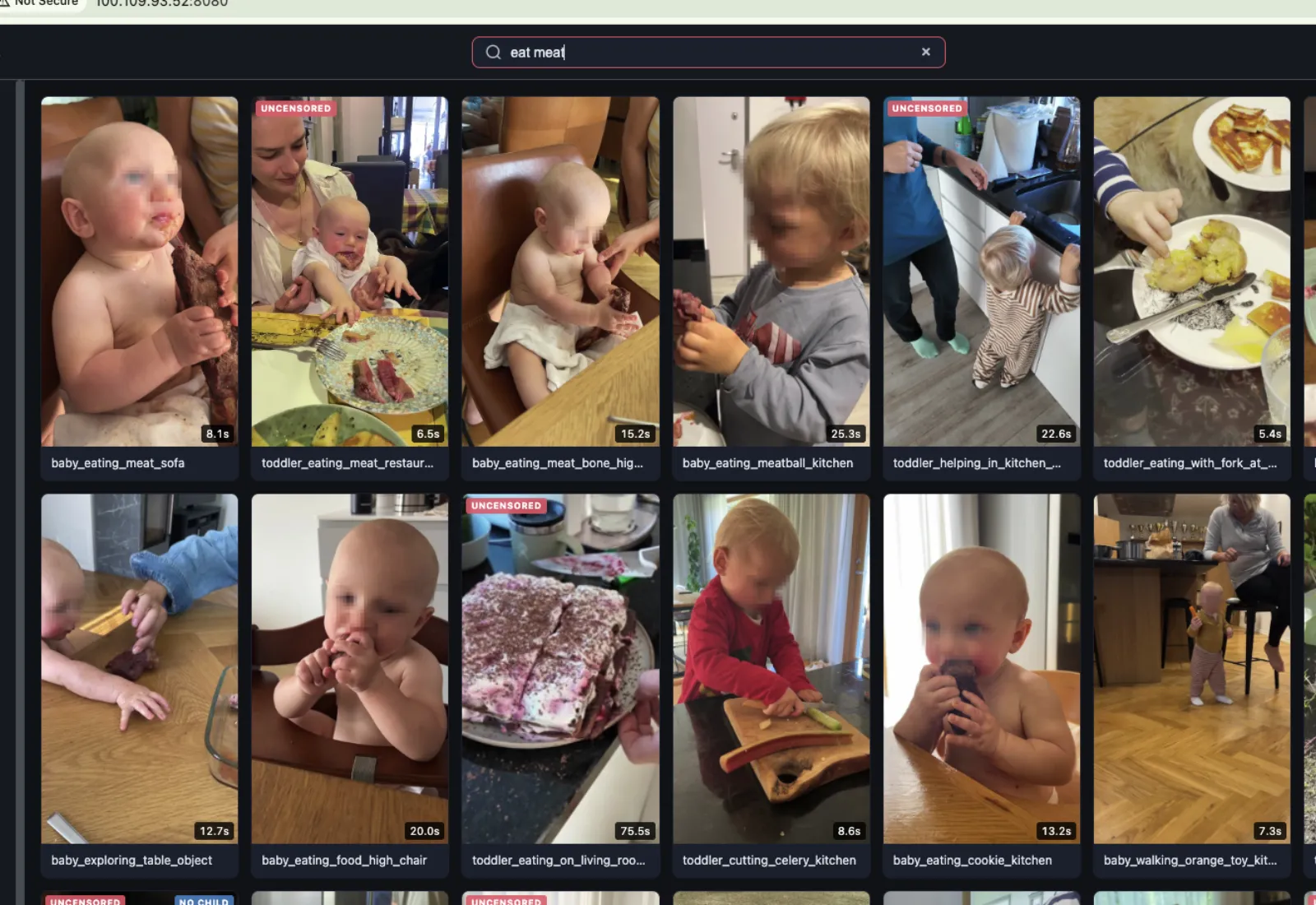
So you can search "eating meat red shirt" and it'll find:
- clips tagged "eating" or "red-shirt"
- clips where the AI wrote something like "toddler in a red cotton t-shirt biting into a piece of steak held in both hands"
The semantic part is the useful one, because you usually don't know the words it used. You know it the way you'd tell another person. "The clip where he's hanging from the bar at the playground" finds it even if the notes say "child gripping overhead wooden dowel with both hands, feet dangling above rubber surface."
There's a pile of filters if you already know the shape: duration, certified / in review / blocked, child in the frame or not, son or daughter, the tag cloud with counts. Footage, images, and published content are different tabs so you're not mixing B-roll with finished reels.
Open a clip and you get the player, the summary, the tags (you can add your own), and the only buttons that matter in an edit: Open in Finder, Copy Path, Copy Link, Download.
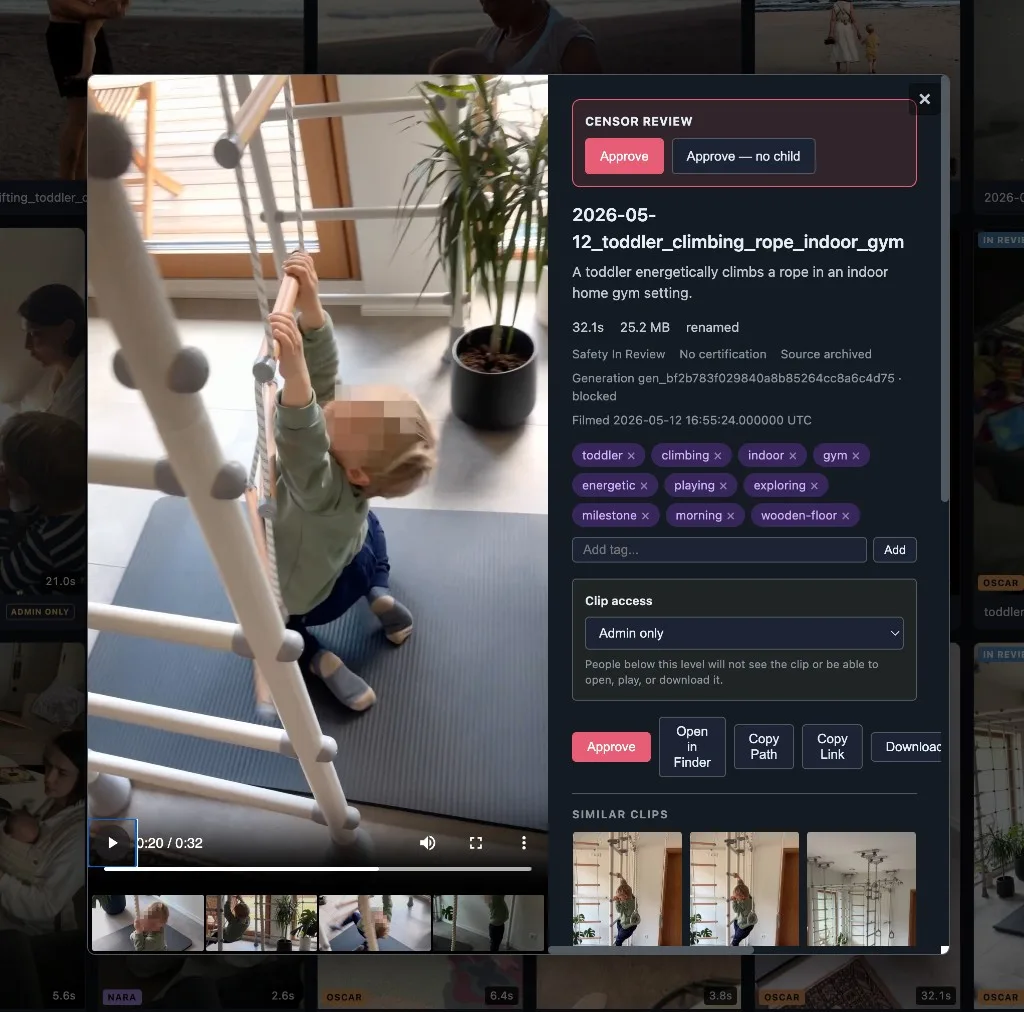
Similar clips is the feature I actually use the most. Editing is often "I need five different angles of roughly the same thing" & this just gives you that.
The Finder button matters for a boring reason. The catalogue keeps a connection to the file on disk, so finding a clip in the search gets you back to the footage you need in the edit. Otherwise you've just made a prettier place to discover that you still don't know where the file lives.
Before this every editor had their own map of the drives. If they left, you were starting from zero.
then other people had to log in
I built this for me. Then I needed to send clips to a freelancer. Then someone on the team had to upload. You cannot put uncensored footage of your kids in a shared folder and hope for the best. I don't care how much you trust the person.
So: freelancer gets censored downloads, that's it. Team can upload and work the review. Trusted sees approved originals. Admin is the whole thing, including users.
That first screenshot with the orange bar - "viewing as freelancer" - is the real permission set, not a mockup. The clip count drops because they don't get everything. That's how I check I'm not about to hand someone the wrong file.
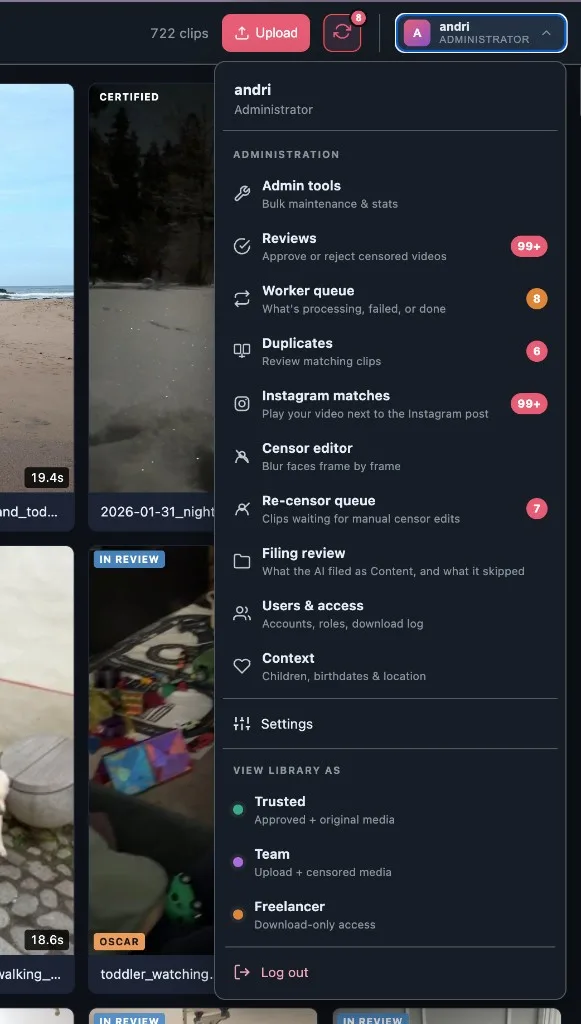
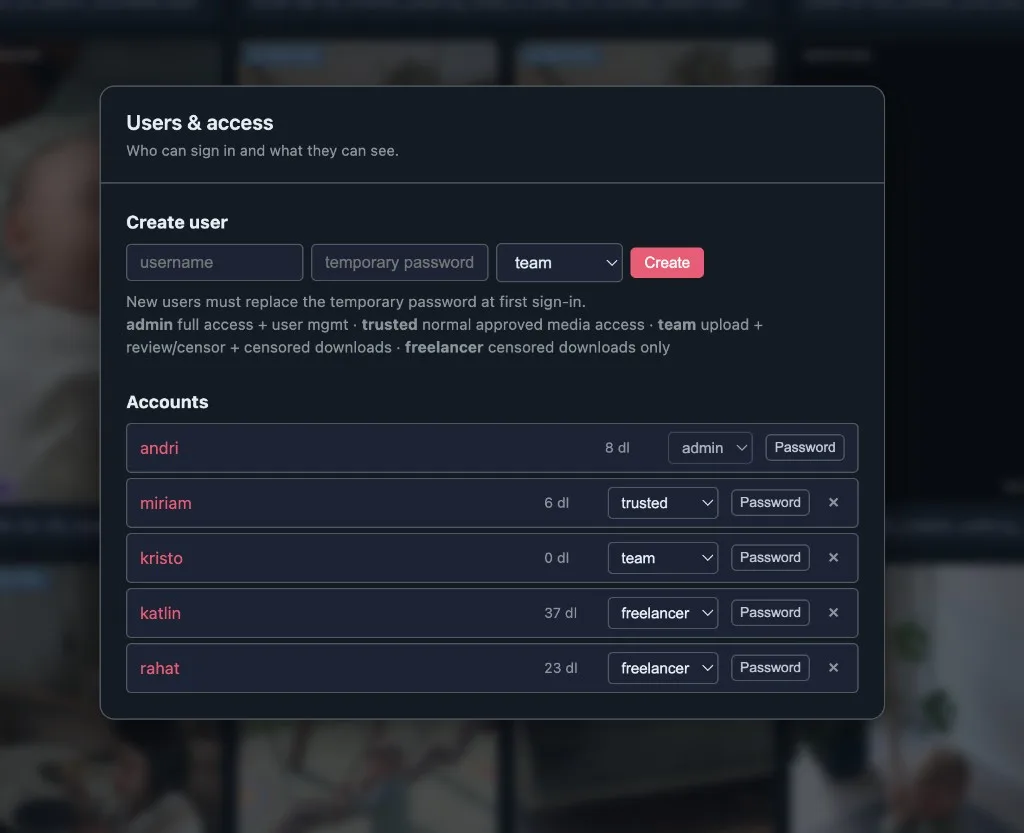
Temporary password, they have to change it. Download count per person. A log of who pulled what. There's a context screen with the kids, birthdates, location - because the son/daughter filters and the blur have to know who they're looking at. Sounds like a lot. It is. That's the point.
A single clip can also be admin-only, even inside a role that otherwise sees the library. Below that level it just isn't there. You can't open it. You can't download it. You don't know it exists.
the blur, once
The recensoring thing only dies if the catalog itself is already censored. Not a second folder called censored_final_FINAL. The catalog is the source. If the face is gone there, it's gone in the timeline.
So there's a review queue. One at a time, at real quality, keyboard. 1 = child in frame, clearly censored. 2 = no child. 3 = the blur missed, send it back. 4 = this clip is useless. The AI will tell you it found three face tracks. Sometimes that's true. You still go through them. I've sat in this queue. It's not exciting. It's how the rule stays true.
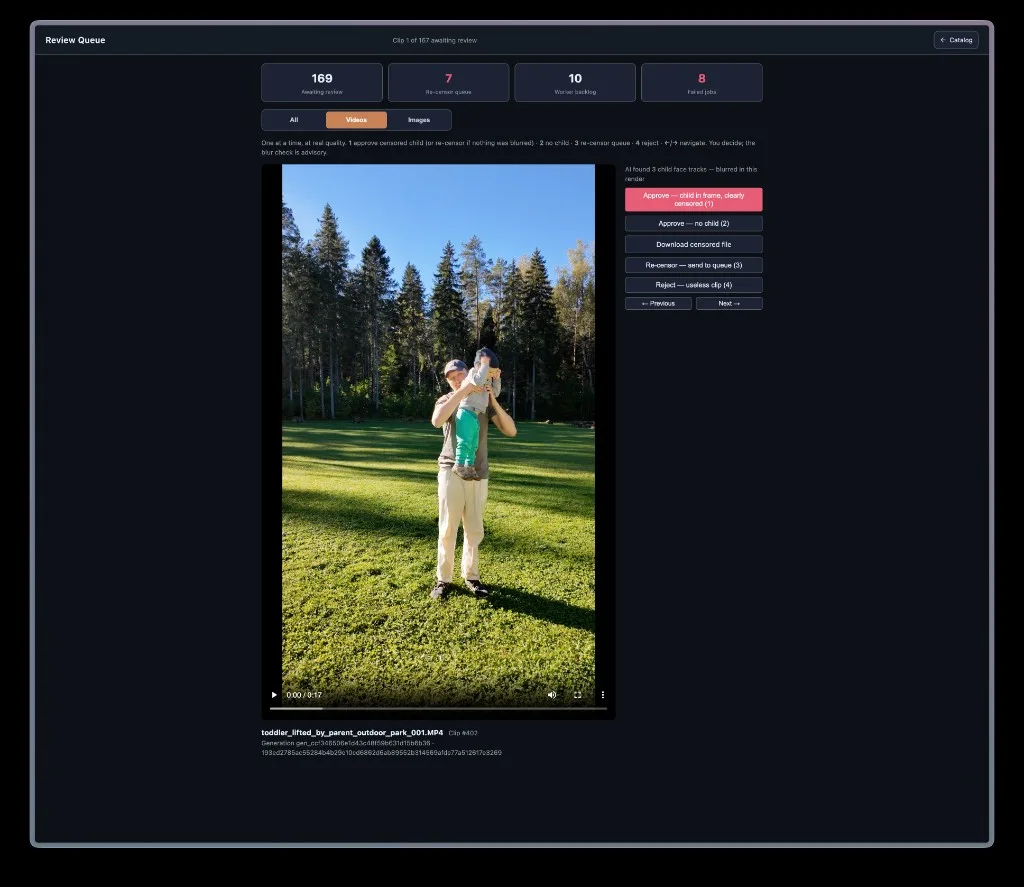
If a frame got through, it goes to a re-censor queue and you do it by hand, frame by frame.
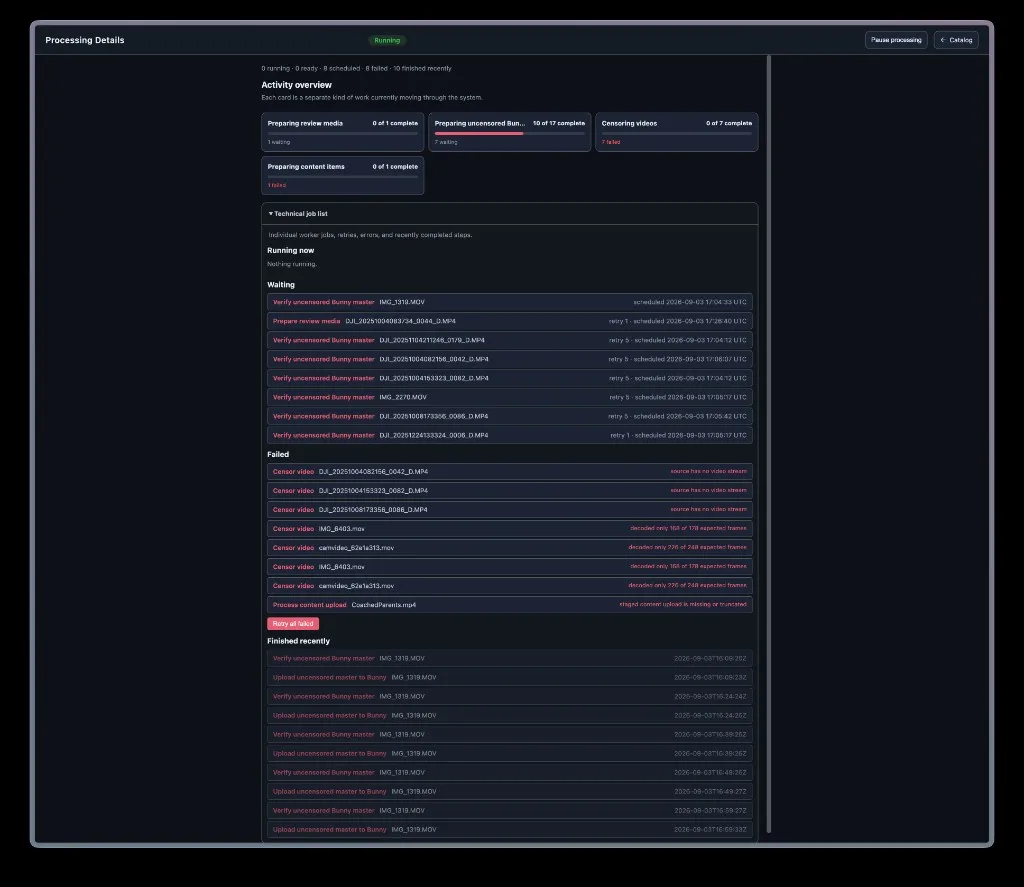
There's a worker screen for the rest of it - preparing review media, pushing uncensored masters up to Bunny, the jobs that fail because a DJI file has no video stream or ffmpeg decoded 168 of 178 frames. I want to see that list. I don't want to guess whether something is still chewing overnight.
the file that went out
This I didn't have when I started.
B-roll is "find the hanging-from-the-bar clip." Published content is a different mess. You have v1, v2, v3. A 90-second cut and a 144-second cut. Six months later someone wants the master that matches the Instagram post, and what you have is a screenshot in Slack and a folder of maybes.
So: Instagram on the left, our version on the right. Play both. Switch the audio to left, right, or both. It suggests a match from duration and the actual Instagram audio. You watch them together and say yes or no. Wrong reel? Search every Content version.
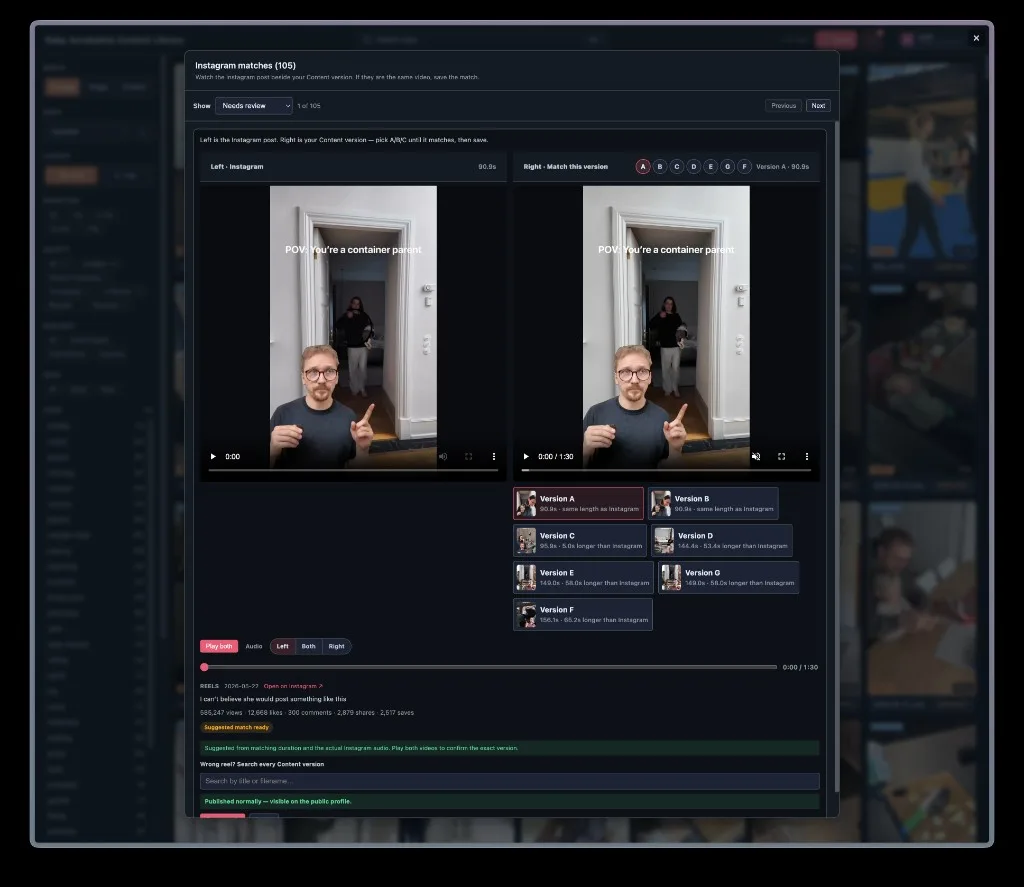
That's how a post with a few hundred thousand views points at a file on disk.
Content is its own tab. Finished pieces - reels, stories, carousels - in stacks, with versions. Published or not. How many cuts. Open one and you get the script, a transcript, the post numbers (views, likes, shares, saves), a link to the live thing.
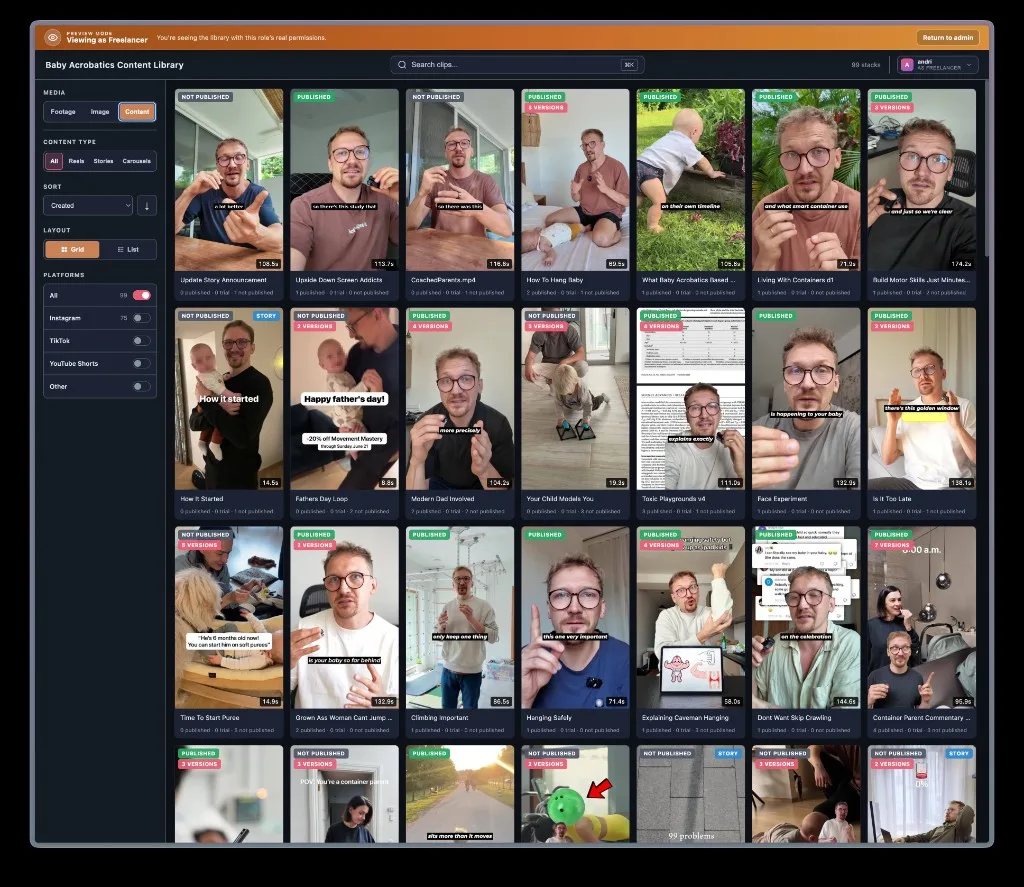
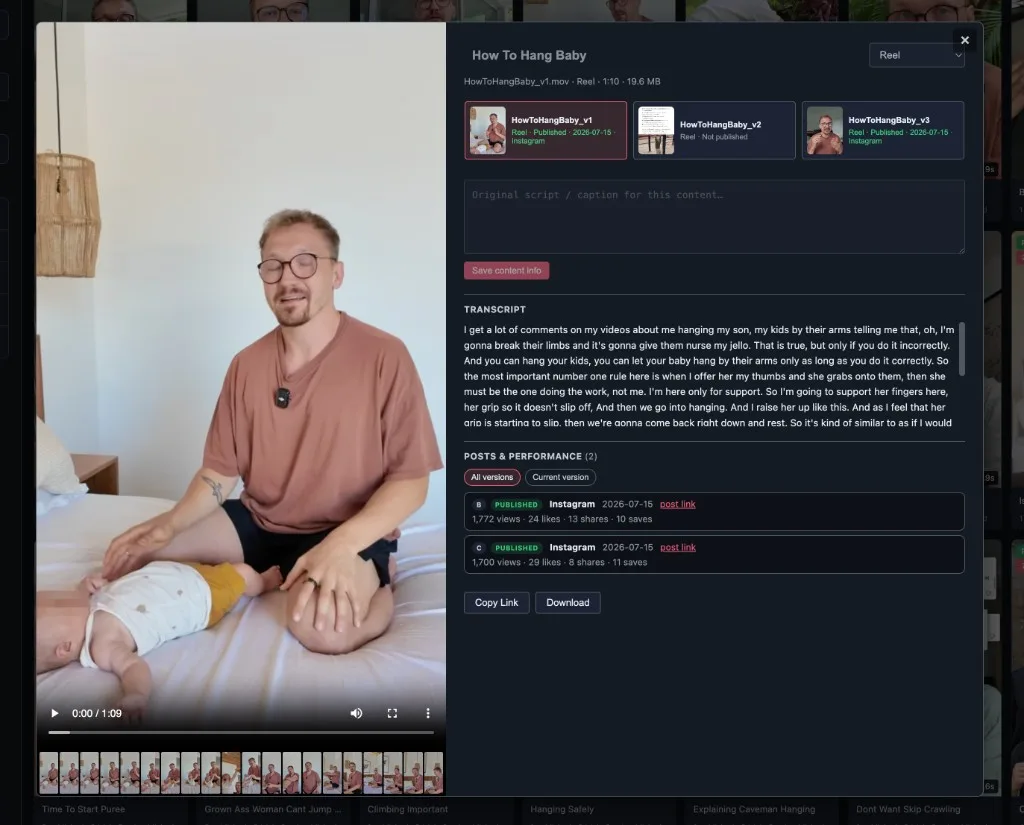
"Which cut did we actually post, and did it work?" is one screen now.
There's an audit on the AI side too - what it filed as Content and what it skipped - because a random B-roll clip quietly becoming a "reel" in the stacks would be a very stupid way to spend an afternoon.
It also fingerprints duplicates. Years of cameras, years of people copying files onto different drives. You don't need five of the same clip.
What it changed
The biggest change is that finding footage no longer depends entirely on remembering where somebody put it. I can search for what I remember seeing, open the clip, and get to the file. Someone helping with an edit gets the version they're allowed to use. A published reel has a connection back to the export instead of being a separate mystery on Instagram.
I wish I'd had this when I was doing content work for other brands. Once you have years of footage and several people working with it, everyone's private memory of the folders becomes a pretty fragile piece of infrastructure.
The AI search is the part that looks interesting in a demo, but a lot of the value came from the less exciting questions around it. Who can download this? Has anyone checked the blur? Which version did we actually use? Those are the things that determine whether the catalogue helps with real work or just gives you another library to maintain.
The next part of the workflow, captions and the recordings I use for feedback, is in Creator Toolset. This is where I go to find the material in the first place.